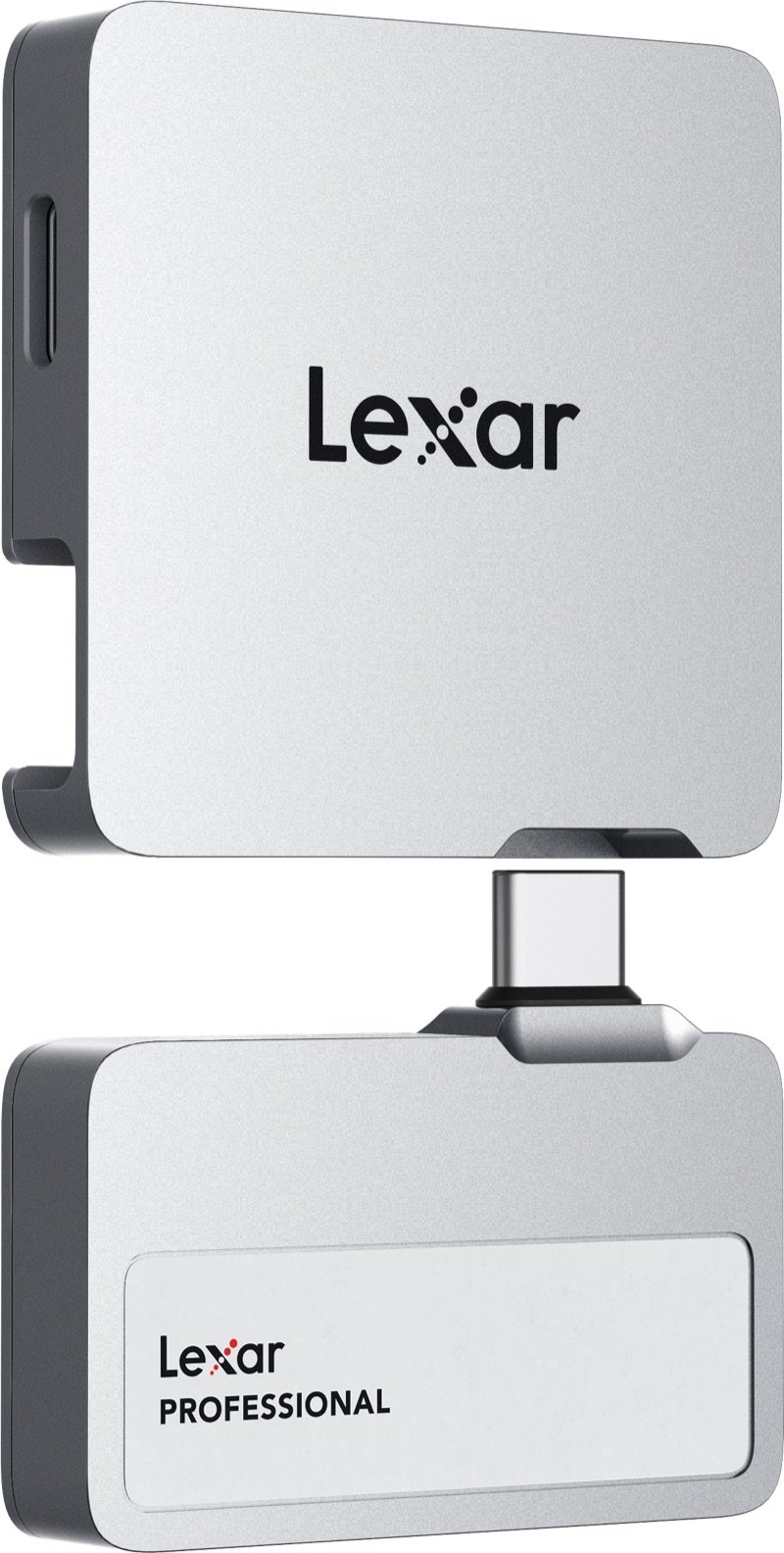
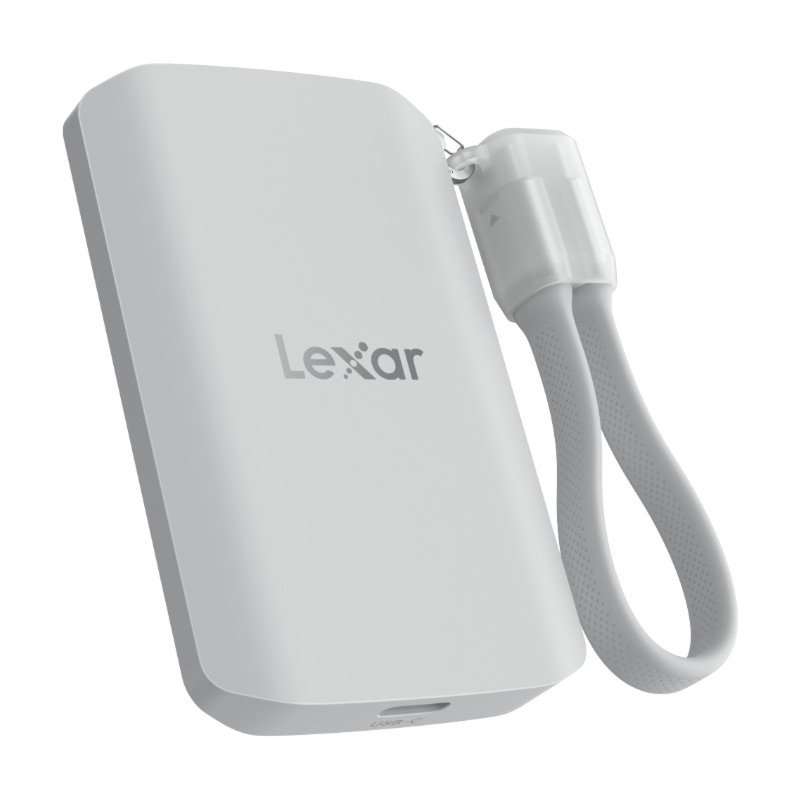
Lexar Professional Go SSD and its hub in silver
Photo: Lexar
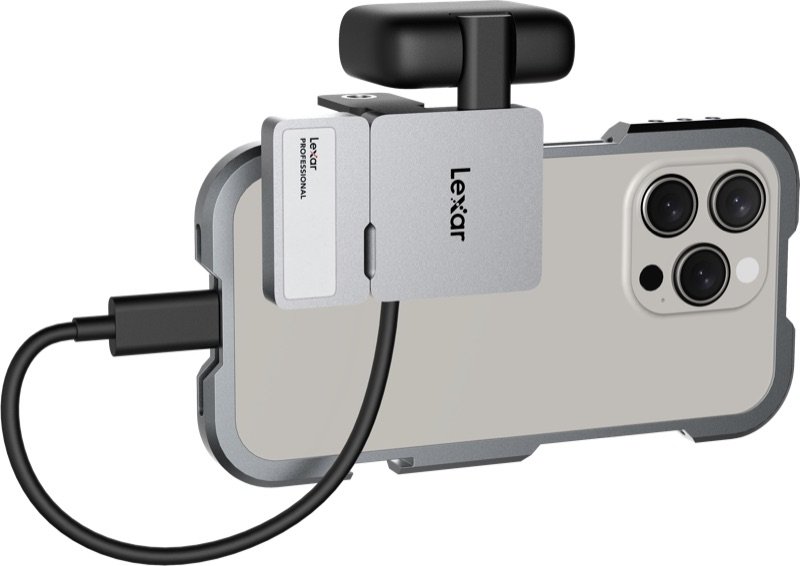
The silver kit on a phone cage, a mic receiver above
Photo: Lexar
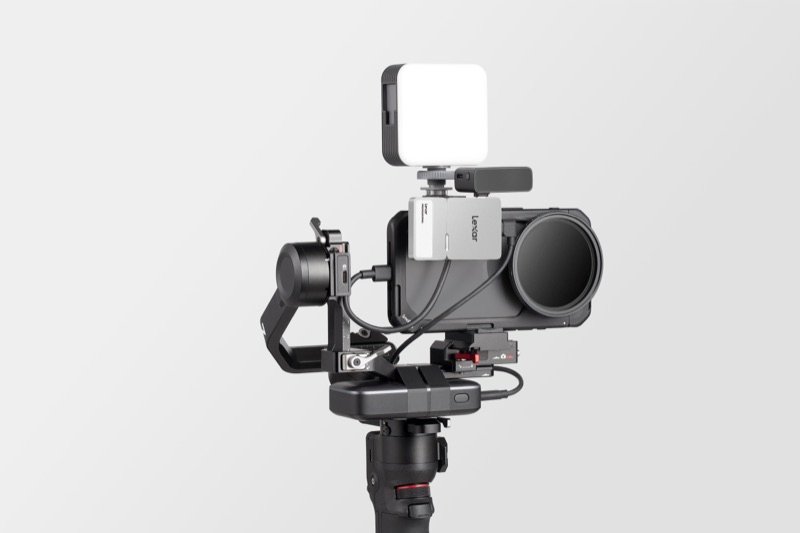
The silver kit on a gimbal phone rig with a light
Photo: Lexar
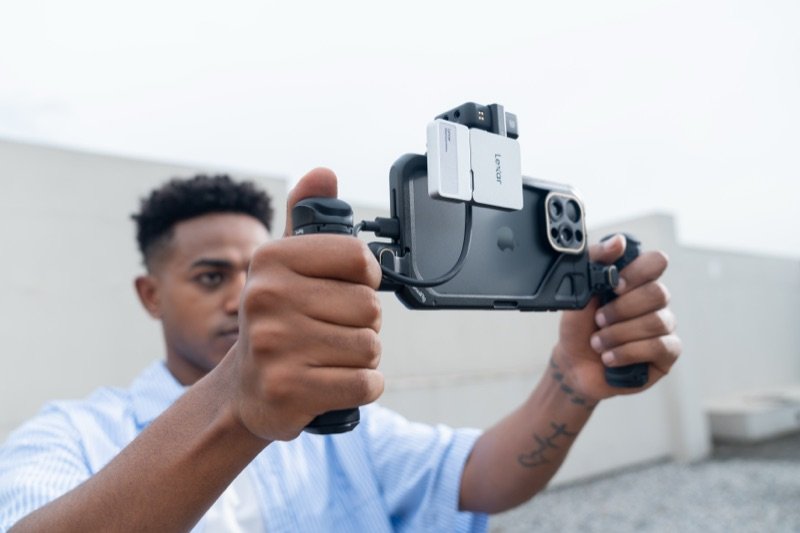
A filmmaker holding a phone rig with the Lexar kit on it
In use · Photo: Lexar

Pick #45 · Docks, Hubs & Storage

Lexar Professional Go Portable SSD with Hub: Worth it for an iPhone rig with a mic and power?

Good, with a catch

One iPhone port records ProRes, powers the rig and takes a mic; Lexar is still testing it on iPhone 17.

  • 1One iPhone port feeds the drive, a mic receiver and a power bank 1114
  • 2Lexar's page lists iPhone 17 support as still in testing 1
  • 3It holds by the USB-C plug alone, and thick cases get in the way 1012

We earn a commission if you buy through links on this page. It costs you nothing extra.

Good for

  • iPhone 15 Pro or 16 Pro rigs with a wireless mic
  • ProRes takes while a power bank feeds the phone
  • Android phones that record in Blackmagic Camera

Not for

  • You film on an iPhone 17 Pro or newer
  • You only need storage, not spare ports

Quick facts

1,050 MB/sLexar's top read figure
976.1 MB/sread, in StorageReview's lab
2 free portson the hub, for mic and power
In testingiPhone 17, says Lexar's page
All specs that matter
Connection
USB-C, USB 3.2 Gen 2 (10 Gb/s)It matches the USB 3 port of an iPhone 15 Pro or 16 Pro, up to 10 Gb/s 78. 1
Speed (Lexar)
Up to 1,050 MB/s read, 1,000 MB/s writeLexar's own figure; TechRadar's computer measured 1,047.91 MB/s read 11. 1
Hub
4 USB-C ports; up to 30 W of powerPhone, drive and two spare ports, as TechRadar used them 11. 1
iPhones Lexar names
15 series or above; 17 still in testingApple allows ProRes to a drive on Pro models only 6. 1
Toughness (SSD)
IP65 dust and water; 1 m (3.3 ft) dropsFrom Lexar's own tests; the hub has no such figure. 1
Size and weight (SSD)
1.00 × 1.71 × 0.32 in, 13 g (0.46 oz)25.5 × 43.5 × 8.25 mm. TechRadar weighed the hub at 23 g (0.81 oz) 11. 1
In the box
Hub, SSD, sleeve, cold-shoe cable, 2 USB-C adapters, bagWith the cold-shoe cable, the drive can sit on a rig's shoe mount 1112. 1
Warranty
Lexar gives a 5-year limited warranty; it does not pay for water, dust or drop damage.1

What it does well

One port does three jobs on a phone rig

The hub is the reason to buy this kit. It has four USB-C ports 1, and TechRadar explains how they are used 11:

  • one goes to the phone
  • one holds the Lexar Professional Go SSD
  • two are spare, for a mic receiver or power

Lexar rates the hub at up to 30 W of power and 10 Gb/s 1. Lon.TV filled every port with a DJI Mic receiver, power and the SSD 14. A whole 4K 120 fps ProRes take recorded: 102 GB in about 5 minutes, with no excessive heat 14.
Well above Apple's speed floor for ProRes

For ProRes video sent straight to a drive, Apple sets two speed floors and a power cap 6:

  • 4K at 60 fps: at least 220 MB/s
  • 4K at 120 fps: at least 440 MB/s
  • at most 4.5 W of power

On computers, the drive cleared both floors with room to spare:

  • StorageReview: 976.1 MB/s read, 929.7 MB/s write 10
  • TechRadar: 1,047.91 MB/s read, 945.17 MB/s write 11
  • Macwelt, on a Mac: 805 MB/s read, 780 MB/s write 12

Lexar does not state the drive's power draw 1, and none of these three labs measured it.

Thumb-size, and the drive can take a knock

The drive is tiny. Lexar's figures for the SSD 1:

  • 1.00 × 1.71 × 0.32 in (25.5 × 43.5 × 8.25 mm)
  • 13 g (0.46 oz)

TechRadar weighed the hub at 23 g, and hub, drive and connector together at 38 g without the drive's rubber sleeve 11.

Lexar rates the SSD IP65 against dust and water, and for 1 m (3.3 ft) drops, by its own tests 1. It gives no such figure for the hub. Lexar's only US recall on the CPSC list dates from 2006 and covered JumpDrive flash drives 17.

Not only for iPhone Pro models

It works beyond Apple's Pro phones. Lon.TV used it on a Pixel 8a with the Blackmagic Camera app, recording to the drive with a mic plugged in at the same time 14. TechRadar says an Android phone needs USB-C 3.0 or above, OTG support, and a port that supplies over 4.5 W 11.

Base iPhones have a slower USB 2 port, up to 480 Mb/s 95, and Apple allows ProRes to a drive only on Pro models 6. Even so, Macwelt says a standard iPhone can record H.265 video to it in Blackmagic Camera 12. ServeTheHome used it on Windows and Mac too 13.

Known problems

From expert tests.

1 of 7 experts; Lexar's page

Lexar has not cleared the iPhone 17

If you own an iPhone 17 Pro, this is the catch. Lexar's own page still says testing with the iPhone 17 series is in progress 13. At launch in October 2024, Lexar named the iPhone 15 Pro and 16 Pro 2.

ServeTheHome's kit worked on an iPhone 15 Pro Max but had issues on a 17 Pro Max 13. It says Lexar is designing an updated version for the 17, with no date 13. The Irish Examiner says it records ProRes on the 17 Pro, without saying which iPhone its writer used 16.

Lexar's own pages disagree, too. Its August 2026 guide says the Go meets every ProRes RAW spec, a format that starts with the 17 Pro 5. Apple lists the iPhone 18 Pro for ProRes to a drive 6, but Lexar's Go pages do not name it 1.

TipOn an iPhone 17 Pro or newer, Lexar's own guide names its ES5 drive instead 5. Check Lexar's page for an update before you buy 1.

4 of 7 expert sources

It hangs on the USB-C plug, and thick cases get in the way

Nothing holds the kit to the phone but the USB-C plug. StorageReview missed a locking catch and says thick cases may have to come off 10. TechRadar felt the plug was a weak point 11. Macwelt found the angled plugs do not fit a thick case 12. The rubber sleeve fought the Fstoppers writer's own case 15.

Others had no trouble. TechRadar's slim Mous case fit snugly 11, and Lon.TV found the hold very secure 14.

TipUse a slim case or a cage 12. Or put the drive on the rig with the cold-shoe cable from the box 1; on a tripod with a cable, StorageReview found it much steadier 10.

3 of 7 expert sources

Small parts, and a slower setup than a magnetic drive

This kit has more pieces than a drive that simply sticks on. TechRadar found it takes a while to configure, though putting it together took under a minute 11.

Lon.TV worried about losing the tiny USB-C connector that joins the hub to the phone, and wished Lexar sold the connectors separately 14. ServeTheHome found the kit's case large next to the drive 13.

TipKeep the pieces in the box and bag Lexar includes 1. Lon.TV found the carrying case keeps most of them together 14.

We earn a commission on these Amazon links. It costs you nothing extra.

Check price on Amazon

Will it work with my phone?

Pick the phone you will film with.

Pick the phone you will film with.

Choose one to see the answer.

Yes, up to 4K 120 fps ProResIts 10 Gb/s USB 3 port allows 4K 120 ProRes to a drive 8. Apple's floor is 440 MB/s 6; StorageReview measured 929.7 MB/s writes 10.
Yes, up to 4K 60 fps ProResApple allows 4K 60 ProRes to a drive here, at 220 MB/s or more 76. TechRadar used it on a 15 Pro, ServeTheHome on a 15 Pro Max 1113.
Not confirmed by Lexar yetLexar: iPhone 17 testing in progress; the 18 is not named 1. ServeTheHome had issues on a 17 Pro Max 13; the Irish Examiner says it works 16.
Works, but no ProRes on a base iPhoneBase iPhones have USB 2 9 and no ProRes to a drive 6; Macwelt: H.265 works in Blackmagic Camera 12. Lon.TV used a Pixel 8a 14.

Other options

We earn a commission on these Amazon links. It costs you nothing extra.

DrawingCheaperLexar Professional Go Portable SSD (drive only, 1TB)The same drive with no hub; fine if nothing else plugs inCheck price on Amazon Lexar Professional Go SSD and its hub in silverThis oneLexar Professional Go with HubA thumb-size drive plus a hub, so one phone port records, charges and takes a micYou are here Lexar ES5 Magnetic Portable SSD in silver, with its short cable loop clipped onBetterLexar ES5 Magnetic Portable SSD (1TB)Named by Lexar for iPhone 17 Pro; faster, but no hub portsCheck price on Amazon
Hub portsNone4 USB-C, 2 spareNone
Rated read (maker)1,050 MB/s1,050 MB/s2,000 MB/s
iPhone 17 (Lexar)Testing in progressTesting in progressNamed for the 17 Pro
Drop (maker)1 m1 m (drive only)3 m
Weight (maker)13 g13 g drive, plus hub80 g
Drawing
Cheaper

Lexar Professional Go Portable SSD (drive only, 1TB)

The same drive with no hub; fine if nothing else plugs in

Hub ports
None
Rated read (maker)
1,050 MB/s
iPhone 17 (Lexar)
Testing in progress
Drop (maker)
1 m
Weight (maker)
13 g
Check price on Amazon
Lexar Professional Go SSD and its hub in silver
This one

Lexar Professional Go with Hub

A thumb-size drive plus a hub, so one phone port records, charges and takes a mic

Hub ports
4 USB-C, 2 spare
Rated read (maker)
1,050 MB/s
iPhone 17 (Lexar)
Testing in progress
Drop (maker)
1 m (drive only)
Weight (maker)
13 g drive, plus hub
You are here

You may also need

A slim case or a phone cage

Thick cases block the angled plugs, Macwelt and StorageReview found 1210; TechRadar's slim case fit snugly 11.

A power bank, for long takes

The hub passes up to 30 W 1; Lon.TV ran power through it while recording 14.

A 10 Gb/s USB 3 cable, only for a cabled setup

For ProRes over a cable, Apple wants USB 3 at 10 Gb/s or faster 6.

Value check

Premium tier

The drive alone, Lexar's Professional Go Portable SSD, is the same drive with the same speed figure, minus the hub and the cold-shoe cable 31. Lexar lists it for far less. Choose it if nothing else needs the phone's port.

Lexar's ES5 also lists for less than this kit, and Lexar's own guide names it for the iPhone 17 Pro 45. It is rated faster and for 3 m drops, but it has no hub, so a mic cannot share the port 4.

Prices change. See today's price on Amazon. We earn a commission on it. It costs you nothing extra.

Questions

Do I need the hub, or is the drive alone enough?

The drive alone is enough if it is the only thing in the phone's port, and Lexar sells it without the hub 3. Get the hub if a mic receiver or a power bank must plug in too 1114. For mobile video, Fstoppers suggests the hub version for its spare mic port 15.

Can it charge my phone while I record?

Yes, through the hub. Lexar rates the hub's power supply at up to 30 W 1, and TechRadar points to that charging for longer shoots 11. Lon.TV recorded a 4K 120 fps ProRes take with power, a mic receiver and the SSD all on the hub 14.

How long can I record on the 1TB?

It depends on the video format. Lon.TV's 4K 120 fps ProRes take filled 102 GB in about 5 minutes 14. On an iPhone 16 Pro with base storage, Fstoppers found the 2TB lifts 4K 30 fps ProRes time from 30 minutes to about 5 hours 15.

For phone video, Fstoppers picks the 2TB with the hub 15. StorageReview and ServeTheHome also measured the 2TB, not the 1TB 1013.

Can I edit video straight off the drive on a computer?

For most work, yes. On a Mac, Macwelt measured 805 MB/s reads and 780 MB/s writes, and found editing from the drive works very well 12. ServeTheHome's chart showed some higher-end video formats struggle 13, and StorageReview found small-file speed lower than on larger drives 10.

How we made this pick17 sources · checked Nov 17, 2026 · we have not used itRead how

We have not used this product ourselves. This brief is built from the maker's specs and manual and from expert tests. Few owner reports were open for us to read, so this page does not say how common a problem is among owners. Sources are listed below.

17sourcesLexar's and Apple's own pages and seven expert write-ups; no owner posts were open to read.
Nov 17, 2026checked
See sources
  1. 1Lexar Professional Go Portable SSD with Hub, Americas product pageNov 17, 2026
  2. 2Lexar UK news: Professional Go Portable SSD with Hub launch (11 Oct 2024)Nov 17, 2026
  3. 3Lexar Professional Go Portable SSD, drive only (cheaper option)Nov 17, 2026
  4. 4Lexar ES5 Magnetic Portable SSD, Americas product page (better option)Nov 17, 2026
  5. 5Lexar Americas blog: iPhone and Android external storage (5 Aug 2026)Nov 17, 2026
  6. 6Apple Support: About Apple ProRes on iPhoneNov 17, 2026
  7. 7Apple Support: iPhone 15 Pro, Tech SpecsNov 17, 2026
  8. 8Apple Support: iPhone 16 Pro, Tech SpecsNov 17, 2026
  9. 9Apple Support: iPhone 16, Tech SpecsNov 17, 2026
  10. 10StorageReview: Lexar Professional Go Portable SSD with Hub (Lyle Smith, 24 Feb 2025)Nov 17, 2026
  11. 11TechRadar: Lexar Professional Go SL400 portable SSD with Hub (Alastair Jennings, 5 Nov 2024)Nov 17, 2026
  12. 12Macwelt: Lexar Professional Go Portable SSD with Hub (Thomas Bergbold, 7 Jan 2025, German)Nov 17, 2026
  13. 13ServeTheHome: Lexar 2TB Professional Go Portable SSD with Hub (Sam Sabinash, 25 Dec 2025)Nov 17, 2026
  14. 14Lon.TV: the Lexar Professional Go USB-C hub and SSD in field use (Lon Seidman, 21 Nov 2024)Nov 17, 2026
  15. 15Fstoppers: Lexar's Go Portable SSD for mobile creators (Alex Coleman, 26 Oct 2024)Nov 17, 2026
  16. 16Irish Examiner: Lexar's portable SSD for pro-grade video (Noel Campion, 7 May 2026)Nov 17, 2026
  17. 17CPSC recalls search (saferproducts.gov) for Lexar, 17 Nov 2026Nov 17, 2026

Update log

  • Nov 17, 2026 First version of this research brief.
How we research

Do you own it?

Tell other buyers how the Lexar Professional Go with Hub works for you.

How long have you owned it? (if you like)

Only your words, and how long you have owned it if you say. No name, no email, no cookie. Nothing shows here until we approve it. How we handle answers.

Did this help?

More picks