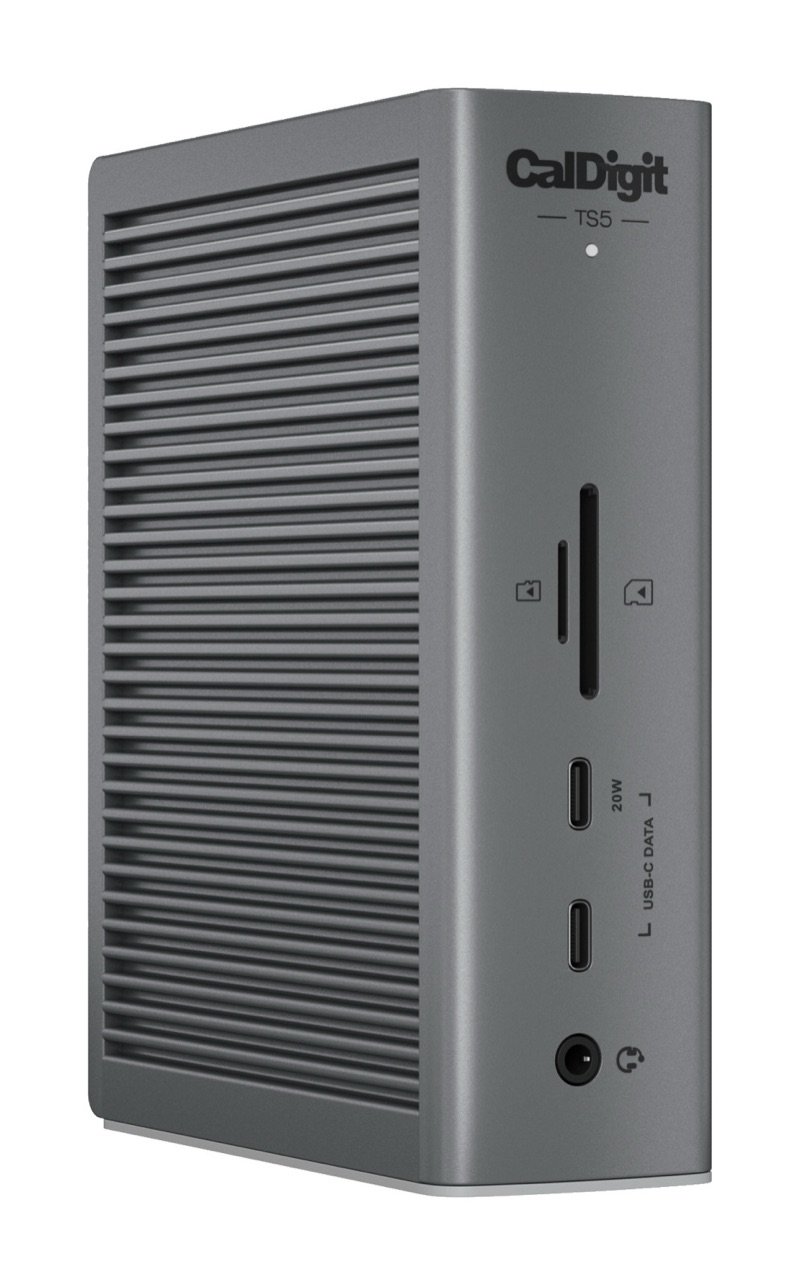
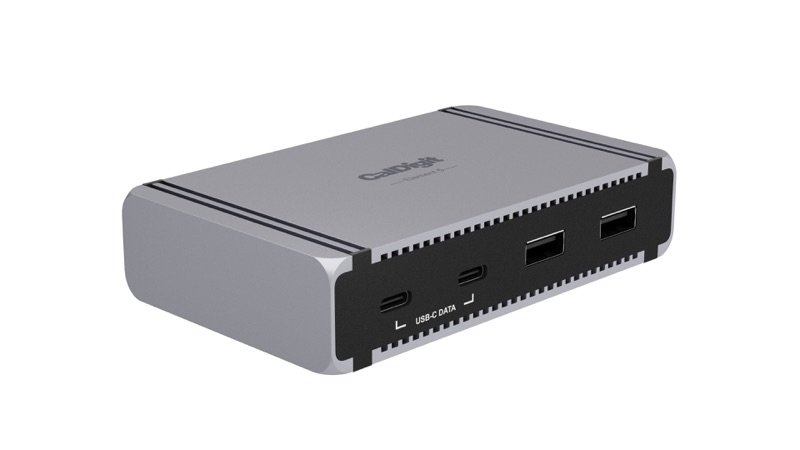
CalDigit TS5 Thunderbolt 5 dock in space gray, standing upright, with its front SD and microSD slots, two USB-C ports and audio jack
Photo: CalDigit
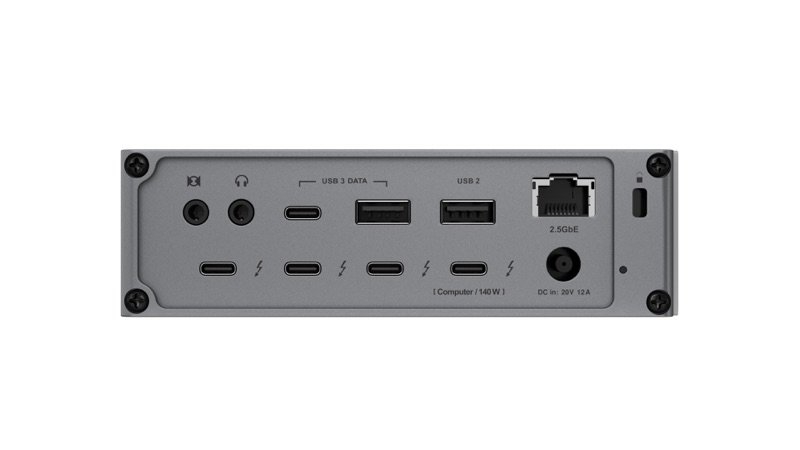
Back of the CalDigit TS5: four Thunderbolt 5 ports, USB-C and USB-A ports, 2.5 Gb Ethernet, audio jacks and the power input
Photo: CalDigit
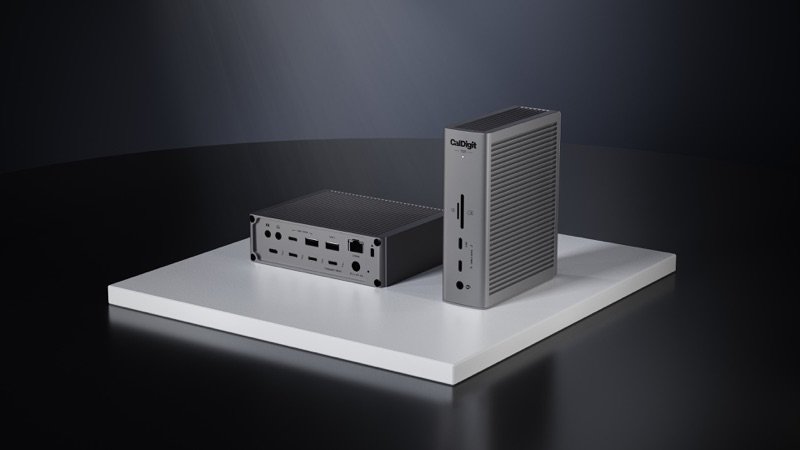
Two CalDigit TS5 docks on a white plinth, one lying flat to show its back and one standing to show its front
Photo: CalDigit
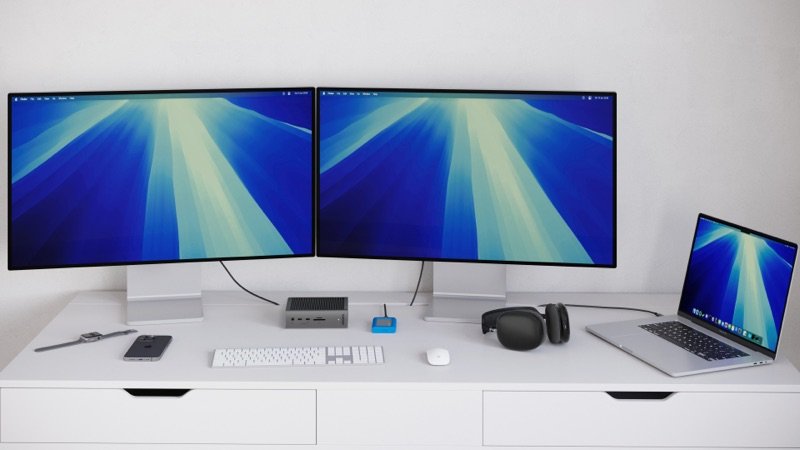
A desk with two monitors and a laptop, the TS5 lying flat under them
In use · Photo: CalDigit
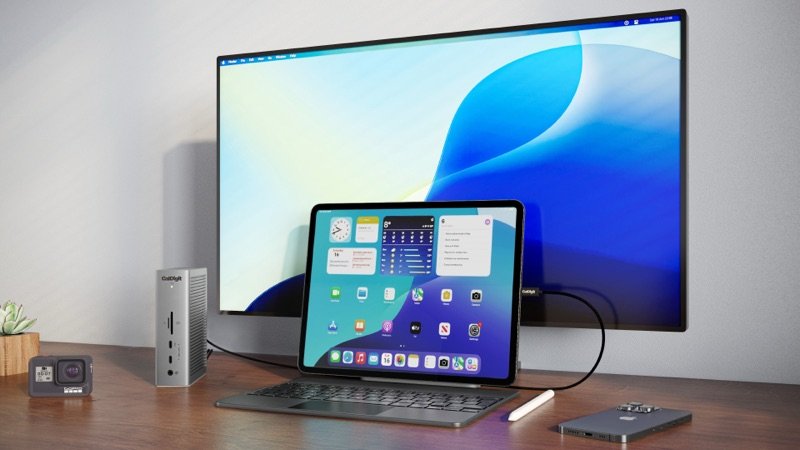
The TS5 standing beside a monitor, with a tablet and laptop plugged in
In use · Photo: CalDigit

Pick #23 · Docks, Hubs & Storage

CalDigit TS5 Thunderbolt 5 Dock: Worth it, and how many screens will it run?

Smart buy

A fast, silent Thunderbolt 5 dock with 140 W charging; M4 and M5 Macs get the most from it.

  • 1A fast SSD through it ran over 5,300 MB/s in Tom's Hardware's test 12
  • 2Also 2.5 Gb/s Ethernet, SD and microSD readers, and audio in and out 1
  • 3No fan: experts found it silent and only warm 121314

We earn a commission if you buy through links on this page. It costs you nothing extra.

Good for

  • M4 or M5 Macs; M5 Pro or Max for 3–4 screens
  • 16-inch MacBook Pros that charge at 140 W
  • A full desk: network, SD cards, audio, fast drives

Not for

  • Your Mac is a base M1, M2 or M3 and you want two screens
  • You need 10 Gb Ethernet or a built-in DisplayPort

Quick facts

140 Wlaptop charging (CalDigit)
4 × TB51 to the laptop, 3 spare
1 screenon base M1–M3 Macs
No HDMI/DPscreens use Thunderbolt ports
All specs that matter
Ports
15: 4 TB5, 3 USB-C, 2 USB-A, SD, microSD, 2.5GbE, 3 audioThe USB ports carry data only, not video; one USB-A port is the slow USB 2.0 kind. 1
Video ports
None built inScreens plug into the 3 spare Thunderbolt 5 ports, directly or with USB-C to HDMI or DisplayPort adapters. 1
Laptop charging
Up to 140 W (CalDigit's figure)Enough for a 16-inch MacBook Pro, says CalDigit. 1
Thunderbolt speed
80 Gb/s each way; up to 120 Gb/s for screensBandwidth Boost gives screens up to 120 Gb/s and leaves 40 Gb/s for everything else. 2
Ethernet
2.5 Gb/sFaster than the usual 1 Gb/s; works on Thunderbolt computers, or USB4 ones with PCIe support. 1
Power brick
240 W, separate (20 V, 12 A)A second box under the desk; CalDigit says use only the adapter in the box. 2
Size and weight
5.55 × 1.65 × 4.46 in (141 × 42 × 113 mm), 1.41 lb (0.64 kg)Stands upright or lies flat; the same case size as the TS4. 1
Warranty
2 years from CalDigit.1

From the maker

Video: CalDigit on YouTube

Introducing the TS5 and TS5 Plus | CalDigit Thunderbolt 5 DocksPlays in YouTube's player. Nothing loads from YouTube until you tap.

What it does well

Fast drives through the dock, measured

Fast drives run fast through the CalDigit TS5, and Tom's Hardware put numbers on it. It plugged a fast SSD in a Thunderbolt 5 case into the dock 12. Reads ran at just over 5,300 MB/s, and writes at 5,520 MB/s 12. CalDigit claims up to 6,200 MB/s for external drives, about double its older TS4 1.

The dock has four Thunderbolt 5 ports: one to your computer and three spare, each rated at 80 Gb/s in both directions 1. You need a Thunderbolt 5 computer for full speed; on Thunderbolt 4 or older, CalDigit says some functions are reduced 2.
Up to 140 W for the laptop

Your laptop charges through the same Thunderbolt cable, at up to 140 W 1. CalDigit says that is what a 16-inch MacBook Pro with M4 Pro or M4 Max needs 1. Its 240 W power brick keeps the full 140 W flowing as you add devices, CalDigit adds 1.

The older TS4 tops out at 98 W 18. For heavy CPU or GPU work, CalDigit still suggests plugging in the laptop's own charger as well 2.

Three spare Thunderbolt ports, more screens on M5 Pro and Max

Three spare Thunderbolt 5 ports leave room for monitors, fast drives or hubs; the TS5 Plus has only two 119. MacRumors and Windows Central prefer the plain TS5 for that 1316.

On the newest chips, it runs more screens through one cable than the TS4 can: three on an M5 Pro, and four with an M5 Max 14. The fourth chains off a Thunderbolt monitor 14.

Tom's Hardware ran two monitors on Windows 11 and on two Macs without trouble 12. One of them was a 49-inch 240 Hz screen 12.

Silent, and it stays only warm

Your desk stays quiet: the TS5 has no fan 12. 9to5Mac called it silent 14. MacRumors found it only lukewarm over weeks of use, and cooler than the TS5 Plus 13.

Tom's Hardware judged heat by touch, not with a thermometer. It found the dock warm even when idle, but never too hot to handle 12.

Its 2.5 Gb/s Ethernet port reached full speed in Tom's Hardware's network check 12.

A desk's worth of ports, and a named safety certificate

Beyond Thunderbolt, the TS5 covers the everyday plugs on a desk 114:

  • three 10 Gb/s USB-C ports; one front port gives 20 W for a phone 1
  • a 10 Gb/s USB-A port 1
  • a slower USB 2.0 port for a mouse or keyboard 1
  • SD and microSD card readers
  • audio in and out

The cable to your laptop plugs in at the back, which keeps the desk tidy 1.

A test lab, Global Certification Corp., certified the TS5 to the safety standard for IT equipment, EN 62368-1:2020 6. The Consumer Product Safety Commission's records show no CalDigit recalls 17.

On sale in the US since June 2025 3, it is Tom's Hardware's pick for most people 12 and a Macworld Editors' Choice 15.

Known problems

From expert tests.

1 of 5 expert outlets

USB-C drives sometimes did not show up

A drive plugged into a USB-C port may sometimes not show up. MacRumors saw SSDs on the two USB-C ports now and then fail to appear, and restarting the Mac fixed it 13. Thunderbolt 5 SSDs worked normally 13. The other four outlets did not report it 12141516.

MacRumors suggests buying from a store with easy returns 13. CalDigit's newest firmware, 71.1, is meant to improve monitor and USB stability 5.

TipPut fast drives on a spare Thunderbolt 5 port, and update the dock to firmware 71.1 with CalDigit's free updater 513.

We earn a commission on these Amazon links. It costs you nothing extra.

Check price on Amazon

Will it run two screens from my Mac?

Pick your Mac's chip.

Pick your Mac's chip.

Choose one to see the answer.

No: one screen (M3: two, lid shut)Base M1–M3 Macs run one external screen through it 410. M3 MacBooks run two only with the lid closed, an outside keyboard and mouse, and power 9.
Yes, two screensUp to two, at up to 6K 60 Hz each, says CalDigit 4. Apple lists two for M4 and M5 MacBook Airs; closing the lid adds none 8. A TS4 runs two as well 4.
Yes, two screens (not three)Two screens through one dock, the same as the cheaper TS4 4. M1–M4 Max chips reach more only with a second dock on another port 4.
Yes: three (Pro) or four (Max)Three screens on an M5 Pro, four on an M5 Max; the fourth must chain off a Thunderbolt monitor 14. The TS4 stops at two on these Macs 4.

Other options

We earn a commission on these Amazon links. It costs you nothing extra.

DrawingCheaperCalDigit TS4Thunderbolt 4 and 98 W, but a DisplayPort and 18 portsCheck price on Amazon CalDigit TS5 Thunderbolt 5 dock in space gray, standing upright, with its front SD and microSD slots, two USB-C ports and audio jackThis oneCalDigit TS5One cable to a Mac for fast drives, charging, network and more screensYou are here DrawingBetterCalDigit TS5 PlusAdds 10 Gb Ethernet, DisplayPort 2.1 and more USBCheck price on Amazon
Thunderbolt4 (40 Gb/s)5 (80 Gb/s)5 (80 Gb/s)
Laptop charging98 W140 W140 W
Spare Thunderbolt ports232
Built-in DisplayPortYes, 1.4NoneYes, 2.1
Ethernet2.5 Gb/s2.5 Gb/s10 Gb/s
Drawing
Cheaper

CalDigit TS4

Thunderbolt 4 and 98 W, but a DisplayPort and 18 ports

Thunderbolt
4 (40 Gb/s)
Laptop charging
98 W
Spare Thunderbolt ports
2
Built-in DisplayPort
Yes, 1.4
Ethernet
2.5 Gb/s
Check price on Amazon
CalDigit TS5 Thunderbolt 5 dock in space gray, standing upright, with its front SD and microSD slots, two USB-C ports and audio jack
This one

CalDigit TS5

One cable to a Mac for fast drives, charging, network and more screens

Thunderbolt
5 (80 Gb/s)
Laptop charging
140 W
Spare Thunderbolt ports
3
Built-in DisplayPort
None
Ethernet
2.5 Gb/s
You are here
Drawing
Better

CalDigit TS5 Plus

Adds 10 Gb Ethernet, DisplayPort 2.1 and more USB

Thunderbolt
5 (80 Gb/s)
Laptop charging
140 W
Spare Thunderbolt ports
2
Built-in DisplayPort
Yes, 2.1
Ethernet
10 Gb/s
Check price on Amazon

You may also need

USB-C to DisplayPort or HDMI adapter

Only for monitors without USB-C: the TS5 has no video port. HDMI from M1–M4 Macs stops at 4K 60 Hz 1.

Longer certified Thunderbolt 5 cable

Only if the 1.0 m (3.3 ft) cable in the box is too short; CalDigit asks for certified 80 Gb/s, 240 W cables 1.

Value check

Premium tier

The TS4 costs only a little less at CalDigit's own list prices. But it has half the Thunderbolt speed, and 98 W charging instead of 140 W 118.

The TS5 Plus costs clearly more. It mainly adds 10 Gb Ethernet, a DisplayPort and more USB ports, while giving up one Thunderbolt port 19.

Prices change. See today's price on Amazon. We earn a commission on it. It costs you nothing extra.

Questions

Can the TS5 give an M1, M2 or M3 MacBook Air two screens?

No. Base M1, M2 and M3 Macs run one external screen through it 4, and Apple lists one external display for the M1 and M2 MacBook Air 1011. An M3 MacBook Air runs two only with the lid closed 9. The TS5 does not support DisplayLink, the usual way around this limit 15.

Does the CalDigit TS5 have HDMI or DisplayPort?

No. Monitors plug into the three spare Thunderbolt 5 ports, directly if they take USB-C or Thunderbolt, or through USB-C to HDMI or DisplayPort adapters 1. HDMI from the Thunderbolt port of an M1–M4 Mac stops at 4K 60 Hz 1. The TS4 and the TS5 Plus each have a DisplayPort built in 1819.

Does it work with a Windows laptop?

Yes, on Windows 11 with Thunderbolt 4 or newer and an Intel 12th Gen or newer chip 1; Thunderbolt 3 Windows PCs are not supported 216. Thunderbolt 5 PCs can run three screens, Thunderbolt 4 PCs two 116.

Is the TS5 worth it over the TS4 on a Thunderbolt 4 Mac?

Less so. On a Thunderbolt 4 computer some of the TS5's functions are reduced 2, and on every Mac below an M5 Pro it runs the same number of screens as the TS4 4. It still charges at up to 140 W instead of 98 W, while the TS4 adds a DisplayPort and five 10 Gb/s USB-A ports 118.

How we made this pick18 sources · checked Nov 16, 2026 · we have not used itRead how

We have not used this product ourselves. This brief is built from the maker's specs and manual and from expert tests. Few owner reports were open for us to read, so this page does not say how common a problem is among owners. Sources are listed below.

18sources
Nov 16, 2026checked
See sources
  1. 1CalDigit TS5 Thunderbolt 5 Dock product page (specs, compare table, FAQ)Nov 16, 2026
  2. 2CalDigit TS5 user manual (English PDF)Nov 16, 2026
  3. 3CalDigit: Introducing the CalDigit TS5 & TS5 Plus (7 Apr 2025, updated 28 Apr 2025)Nov 16, 2026
  4. 4CalDigit: MacBook Multiple Monitor Support with CalDigit Thunderbolt Docks (modified 3 Mar 2026)Nov 16, 2026
  5. 5CalDigit: TS5 Plus, TS5 and Element 5 Hub macOS firmware update (modified 29 Sep 2026)Nov 16, 2026
  6. 6Global Certification Corp. Certificate of Compliance, CalDigit TS5 (Report L541703, EN 62368-1:2020)Nov 16, 2026
  7. 8Apple Support: How many displays can be connected to MacBook Air (10 Mar 2026)Nov 16, 2026
  8. 9Apple Support: Use dual monitors with MacBook Air and MacBook Pro with M3 chipNov 16, 2026
  9. 10Apple: MacBook Air (M2, 2022) Tech SpecsNov 16, 2026
  10. 11Apple: MacBook Air (M1, 2020) Tech SpecsNov 16, 2026
  11. 12Tom's Hardware: Testing the top Thunderbolt 5 docks (Brandon Hill, 8 May 2026)Nov 16, 2026
  12. 13MacRumors: CalDigit TS5 and Element 5 Hub, two Thunderbolt 5 docks (Juli Clover, 5 Jun 2026)Nov 16, 2026
  13. 149to5Mac: CalDigit TS5, the best Thunderbolt 5 dock for most Mac users (Jeff Benjamin, 26 Jan 2026)Nov 16, 2026
  14. 15Macworld: CalDigit TS5 Thunderbolt 5 Dock (Simon Jary, 4 Oct 2025)Nov 16, 2026
  15. 16Windows Central: CalDigit TS5, cheaper but what is it missing? (Cale Hunt, 19 Nov 2025)Nov 16, 2026
  16. 17CPSC recalls search (saferproducts.gov) for CalDigit, 16 Nov 2026Nov 16, 2026
  17. 18CalDigit TS4 Thunderbolt 4 Dock product page (cheaper option)Nov 16, 2026
  18. 19CalDigit TS5 Plus Thunderbolt 5 Dock product page (better option)Nov 16, 2026

Update log

  • Nov 16, 2026 Verdict now Smart buy, under our written verdict rule. Easier to read, same facts and sources; a side-by-side table of the alternatives.
  • Nov 16, 2026 Problems section now based on expert write-ups.
  • Nov 16, 2026 First version of this research brief.
How we research

Do you own it?

Tell other buyers how the CalDigit TS5 works for you.

How long have you owned it? (if you like)

Only your words, and how long you have owned it if you say. No name, no email, no cookie. Nothing shows here until we approve it. How we handle answers.

Did this help?

Related

More picks