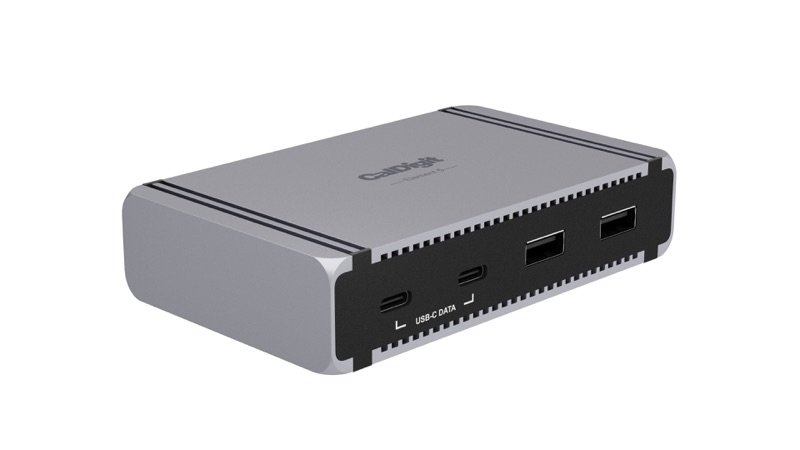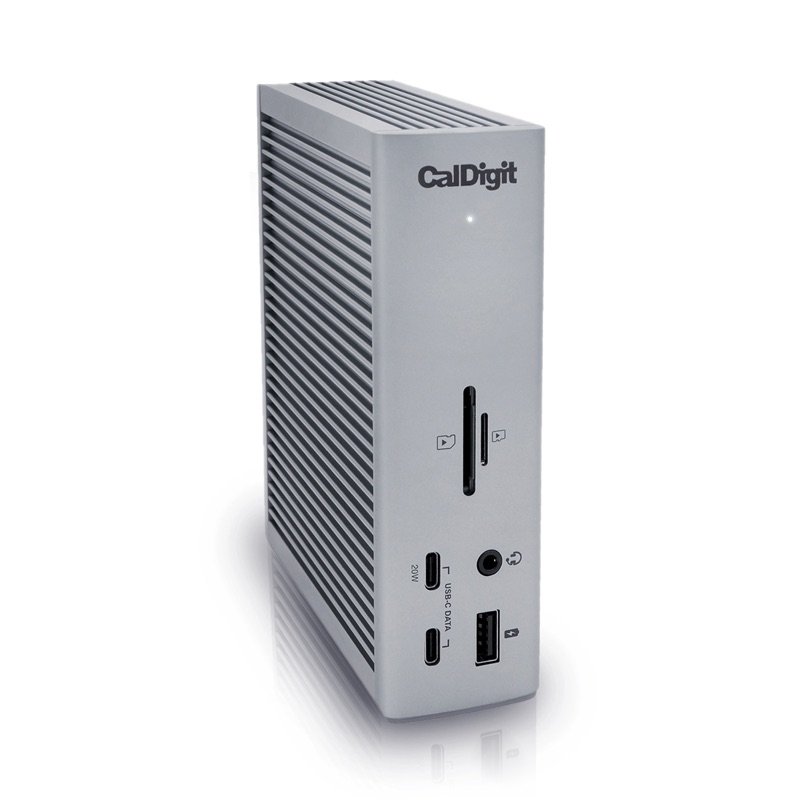
CalDigit TS4 Thunderbolt 4 dock in space gray, standing upright, with its front ports
Photo: CalDigit
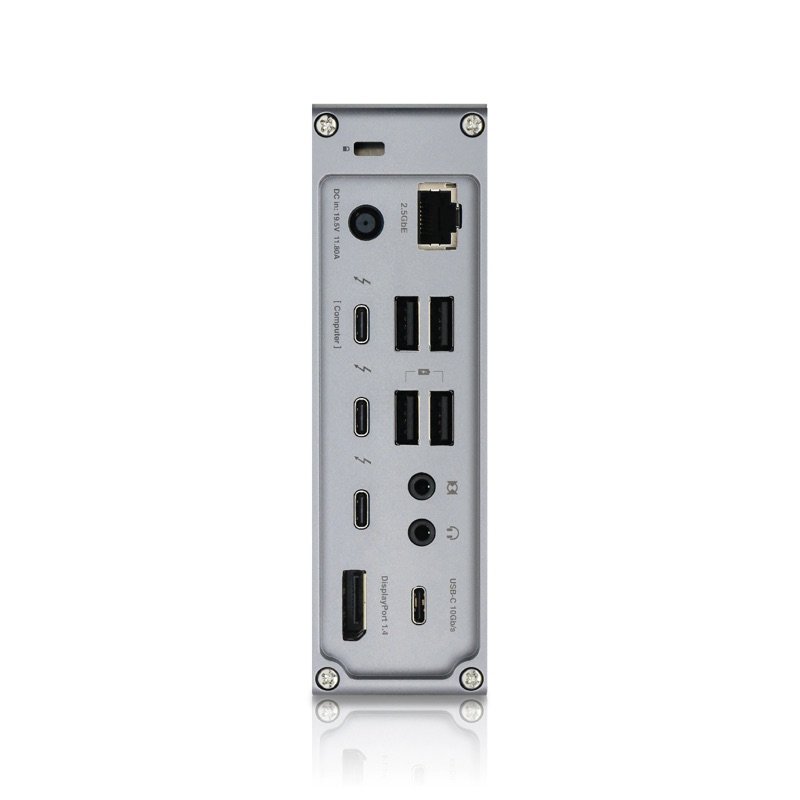
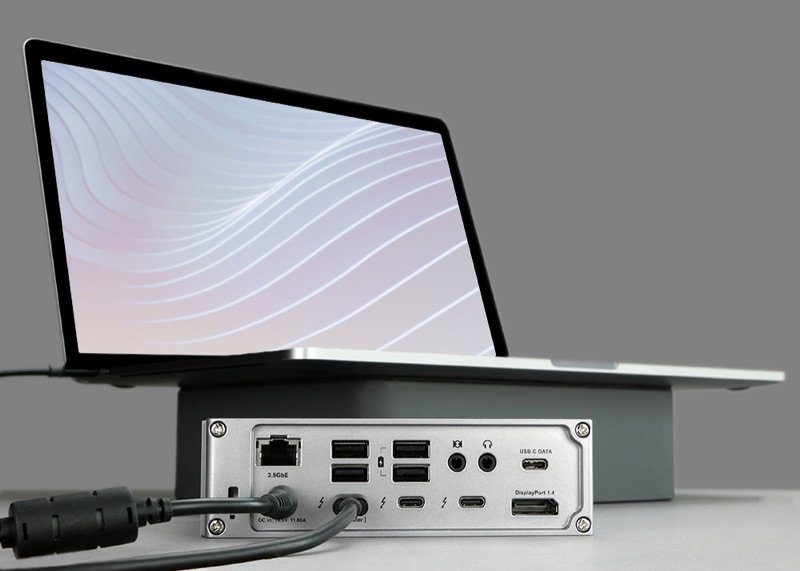
Back of the CalDigit TS4, with its Thunderbolt, USB, DisplayPort, Ethernet and power ports
Photo: CalDigit
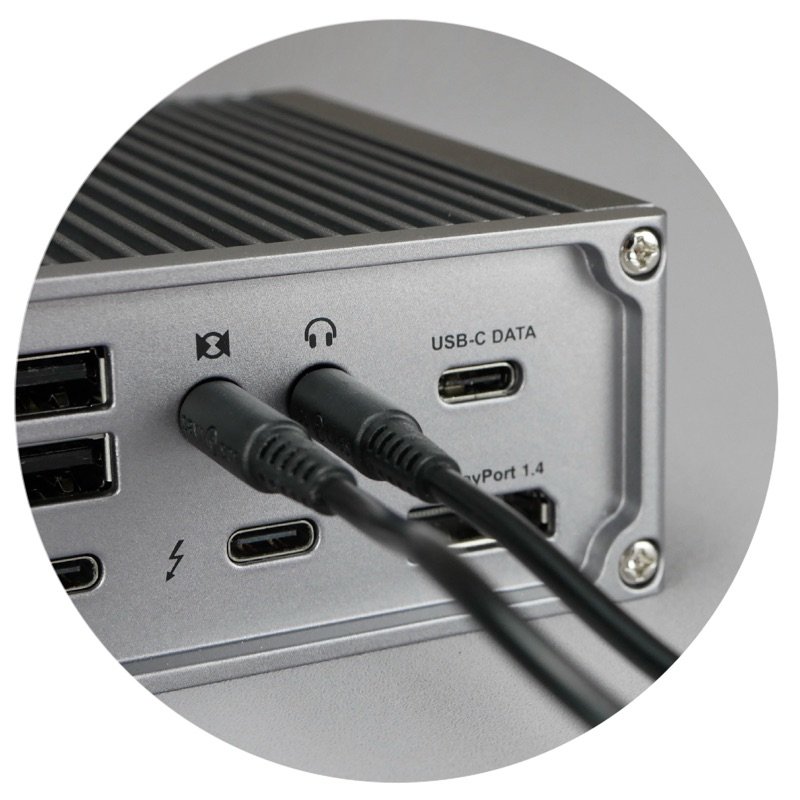
Close view of the CalDigit TS4 with audio cables in its rear jacks
Photo: CalDigit
CalDigit TS4 lying flat under an open laptop on a desk
In use · Photo: CalDigit
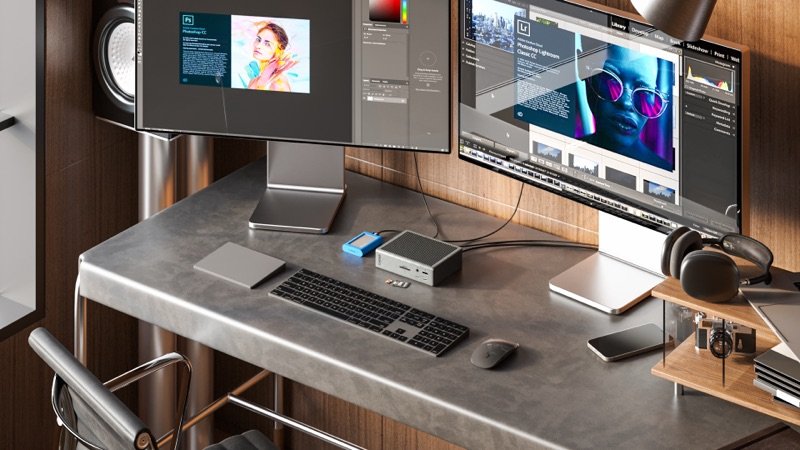
The TS4 lying on a desk under two monitors, cables plugged in
In use · Photo: CalDigit
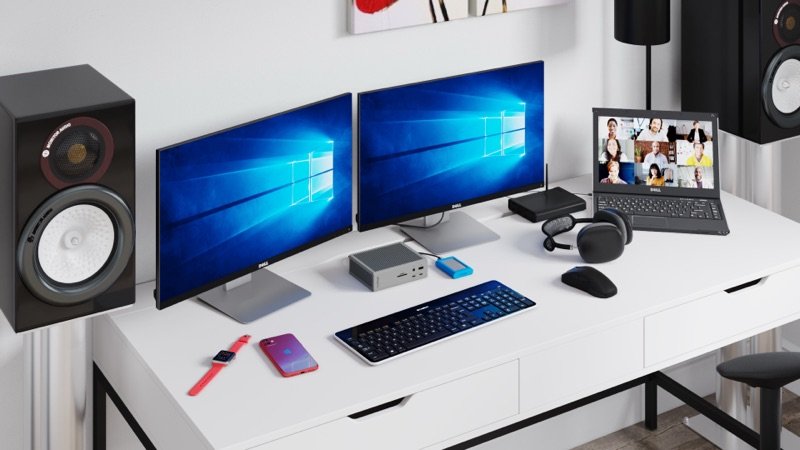
A white desk with two monitors and a laptop, the TS4 between them
In use · Photo: CalDigit

Pick #36 · Docks, Hubs & Storage

CalDigit TS4 Thunderbolt 4 Dock: Still worth it next to the TS5 on a Thunderbolt 4 laptop?

Good, with a catch

An 18-port Thunderbolt 4 dock with DisplayPort and 98 W; some owners see Ethernet or screens drop out.

  • 19 of 39 owners lost Ethernet or a screen, mostly after sleep or a restart 272829
  • 2Five 10 Gb/s USB-A ports and a DisplayPort are built in 1
  • 3Runs on Thunderbolt 3 PCs and on Macs from macOS 11.4 1

We earn a commission if you buy through links on this page. It costs you nothing extra.

Good for

  • Thunderbolt 4 or USB4 laptops, like M4 MacBook Airs
  • A DisplayPort screen and lots of USB-A devices
  • Thunderbolt 3 Windows PCs, or Macs on macOS 11.4 to 14

Not for

  • Your Mac has Thunderbolt 5, or you want 3–4 screens
  • Your 16-inch MacBook Pro must charge at 140 W

Quick facts

18 portsincl. DisplayPort 1.4
98 Wlaptop charging (CalDigit)
40 Gb/sThunderbolt 4 link
Same as TS5screens on Macs below M5 Pro
All specs that matter
Ports
18: 3 TB4, 3 USB-C, 5 USB-A, DP, SD, microSD, LAN, 3 audioThe USB ports carry data only; the front USB-C gives 20 W for a phone. 1
Video out
DisplayPort 1.4 plus 2 spare Thunderbolt 4 portsHDMI needs an active adapter; Macs give HDMI at most 4K 60 Hz. 1
Laptop charging
Up to 98 W (CalDigit's figure)Plenty for a MacBook Air; a 16-inch MacBook Pro fast-charges only at 140 W 10. 1
Link to the computer
Thunderbolt 4, 40 Gb/s; drives up to 3,200 MB/sHalf the TS5's link; Thunderbolt 5 drives slow to Thunderbolt 4 speed. 8
Ethernet
2.5 Gb/sNeeds Thunderbolt, or USB4 with PCIe; not plain USB-C laptops 4. 1
Power brick
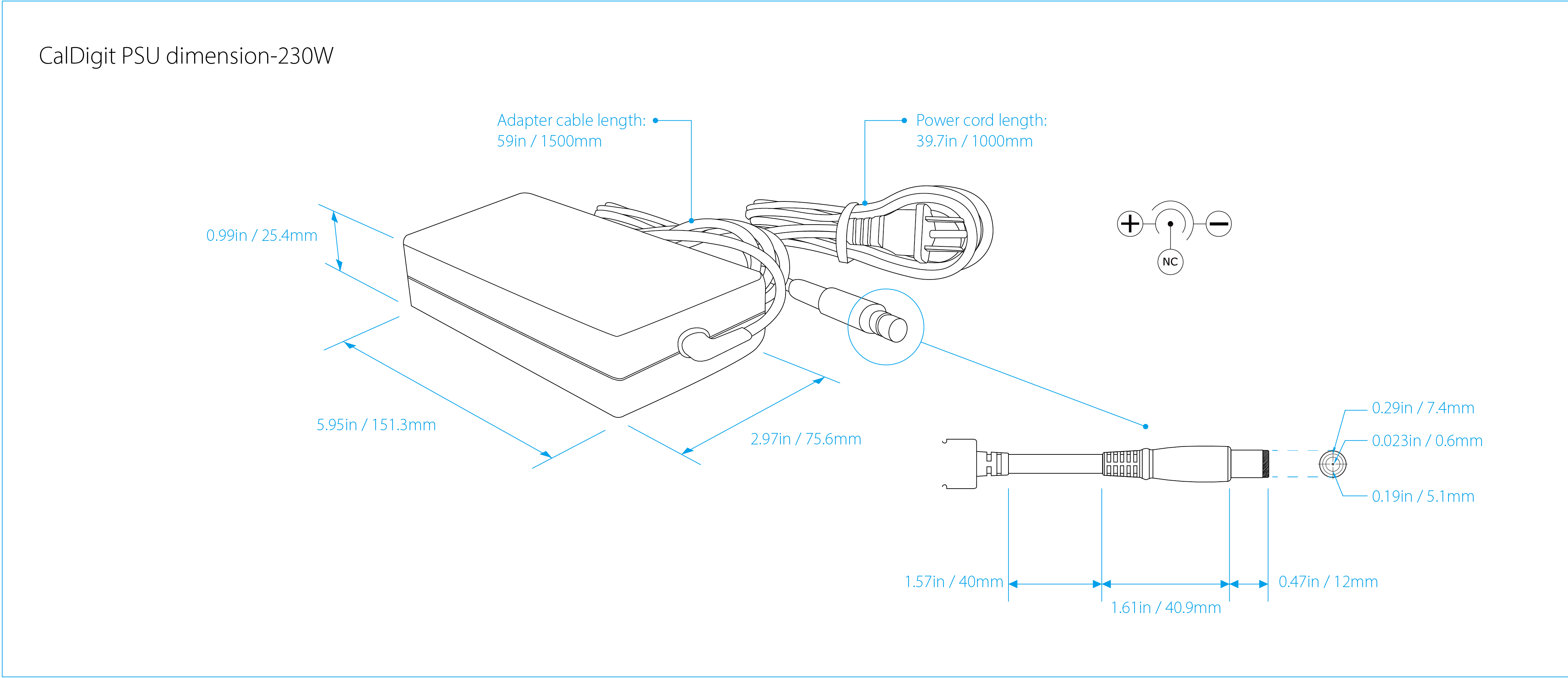
230 W, 5.95 × 2.97 × 0.99 in (151 × 76 × 25 mm)A second box under the desk, on a 59 in (1.5 m) cable. 7
Size and weight
1.41 lb (0.64 kg), 5.55 in (141 mm) tallStands on a 1.65 × 4.46 in (42 × 113 mm) base, or lies flat. 1
Computers
Thunderbolt 3/4/5, USB4, USB-C; macOS 11.4+, Windows 10+Wider than the TS5, which needs macOS 15, and Thunderbolt 4+ on Windows 8. 1
Warranty
2 years from CalDigit.1

What it does well

A DisplayPort and five fast USB-A ports built in

A monitor and older USB-A gear plug straight into the CalDigit TS4.

It packs 18 ports into a box 5.55 in (141 mm) tall 1:

  • three Thunderbolt 4 ports: one to your laptop, two spare 1
  • three USB-C and five USB-A ports, all at 10 Gb/s 1
  • a DisplayPort 1.4 1
  • SD and microSD card readers
  • 2.5 Gb Ethernet 1
  • three audio jacks

The newer TS5 has no video port and only one fast USB-A port 8. In return for the DisplayPort, the TS4 has one spare Thunderbolt port fewer, as Windows Central and Macworld note 1719.
98 W for the laptop, held as you add devices

Up to 98 W reaches your laptop, and CalDigit says it keeps all of it however many devices you add 1. A 230 W brick supplies the power 1.

Apple's fast-charge page names adapters and displays, but no docks 10. Still, 98 W beats the display power Apple asks for 110:

  • MacBook Air: a display giving 85 W 10
  • 14-inch MacBook Pro: a display giving 94 W 10

A 16-inch MacBook Pro fast-charges only on Apple's 140 W adapter 10. CalDigit says 98 W still charges it in most use 1. Laptop Mag's Dell XPS 15, made for a 140 W charger, charged to full on the TS4, just more slowly 24.

Ports and network ran faster in Larry Jordan's test

Files move faster through the TS4 than through the Mac's own ports, in one writer's runs. Larry Jordan ran each port three times from an M1 Pro MacBook Pro and averaged the results 16.

What he found 16:

  • USB ports: about 35% faster than the Mac's own 16
  • SD slot: 80% faster 16
  • large files to a NAS server over 2.5 Gb Ethernet: 250 MB/s writing, 170 MB/s reading 16
  • the same over the Mac's 1 Gb port: about 115 MB/s 16

That was 2022 firmware on one desk. MacRumors also saw top router speeds through it, but gave no number 23.

Works with older Macs and Windows PCs the TS5 leaves out

Older Macs and Windows PCs that the TS5 turns away still work with the TS4. It runs on 1:

  • Thunderbolt 3, 4 and 5 computers 1
  • USB4 and plain USB-C computers 1
  • macOS 11.4 or newer, and Windows 10 or newer 1

The TS5 needs macOS 15, and on Windows a Thunderbolt 4 PC with an Intel 12th Gen or newer chip 8.

Eight of the 39 owners run their TS4 with Windows or Linux machines 2728. Some swap one cable between a Mac and a PC 2728. Windows Central ran two screens from laptops of five brands; one needed a BIOS update first 17.

Still updated, quiet, and a named safety certificate

It is an older dock, but CalDigit still supports it. It has been on sale since February 2022 32. CalDigit's firmware page, last changed in January 2026, lists Thunderbolt firmware 45.1, and its product page covers M5 Macs 21.

Larry Jordan found it silent, with no heat to notice 16. Its safety certificate comes from a test lab: Global Certification Corp. certified it to EN 62368-1, the safety standard for IT equipment 6. CalDigit has never had a product recalled in the US, going by the CPSC's records 31.

All 11 expert writers recommend it, though most wrote in 2022 and 2023 1617181920212223242526. And 19 of the 39 owners are happy with it 27282930.

What owners complain about

From 39 owner comments on 4 sites

9 of 39 owners

Ethernet, a screen or other ports can drop out

Ethernet, a second screen or other ports may drop out, mostly after the computer sleeps or restarts. Nine of the 39 owners lost one of these until they replugged the dock or got a fix 272829.

Five saw it after sleep, a restart or a boot 2728. Three of those five used AMD Framework laptops, in 2024 and 2025 2728. Four more could not get Ethernet working in 2022, two of them right after a macOS update 29.

CalDigit has an article on drop-outs after wake on Apple silicon Macs. Its fix is macOS Ventura plus firmware 39 or newer 3. Larry Jordan 16 and iMore 25 saw drop-outs too.

Two of the four places these owners posted are help threads, so the share among all owners is likely lower.

TipUpdate to firmware 45.1 with CalDigit's free Mac updater (macOS 13.1 or newer). If Ethernet still drops, follow CalDigit's steps, which turn off Energy Efficient Ethernet 24.

6 of 39 owners

On AMD laptops with Linux, screens may not be recognized

On an AMD laptop with Linux, a screen on the dock may show up as an unknown display 28. It then sticks at 640 × 480, a very low resolution 28. Six owners running Linux on Framework laptops saw this, at least five of them AMD-based 28.

They blame AMD's Linux graphics driver. One owner's laptop worked on Windows 11, and another's older Intel board worked with the same dock 28.

TipOwners fixed it with USB-C to DisplayPort cables or active adapters instead of passive HDMI adapters 28.

4 of 39 owners

Sound through the dock can go missing

You may lose sound through the dock, but every report dates from its early firmware. Four owners lost sound, all in 2022 and 2023 2928.

Two had silent speakers on the dock's audio jacks, and one lost a Studio Display's speakers and camera through it. One more found a keyboard with a built-in USB hub clashing with the dock's audio 2928.

Only the front or the rear audio outputs work at a time, CalDigit notes, and the front wins 1.

TipUse one audio output side at a time, move a keyboard with a built-in hub to another USB port, and update the firmware 1282.

We earn a commission on these Amazon links. It costs you nothing extra.

Check price on Amazon

Is the TS4 enough for my Mac, or do I need the TS5?

Pick your Mac. CalDigit's chart covers M1 to M5 chips.

Pick your Mac. CalDigit's chart covers M1 to M5 chips.

Choose one to see the answer.

Yes: the TS5 adds no screensOne screen through either dock; M3 MacBooks run two only with the lid shut 512. The TS5's full speed needs a Thunderbolt 5 Mac 8.
Yes: two screens, like the TS5Two screens through either dock 511. These Macs have 40 Gb/s Thunderbolt 4, so a TS5 links no faster 15148.
Screens yes; charging is slowerTwo screens either way 5. Fast charging needs 140 W 10; the TS4's 98 W charges it in most use, says CalDigit 1, and the TS5 gives 140 W 8.
Get the TS5: 3 or 4 screensAn M5 Pro runs three screens and an M5 Max four through a TS5, two through the TS4 5. Thunderbolt 5 Macs get double the link only from a TS5 138.

Other options

We earn a commission on these Amazon links. It costs you nothing extra.

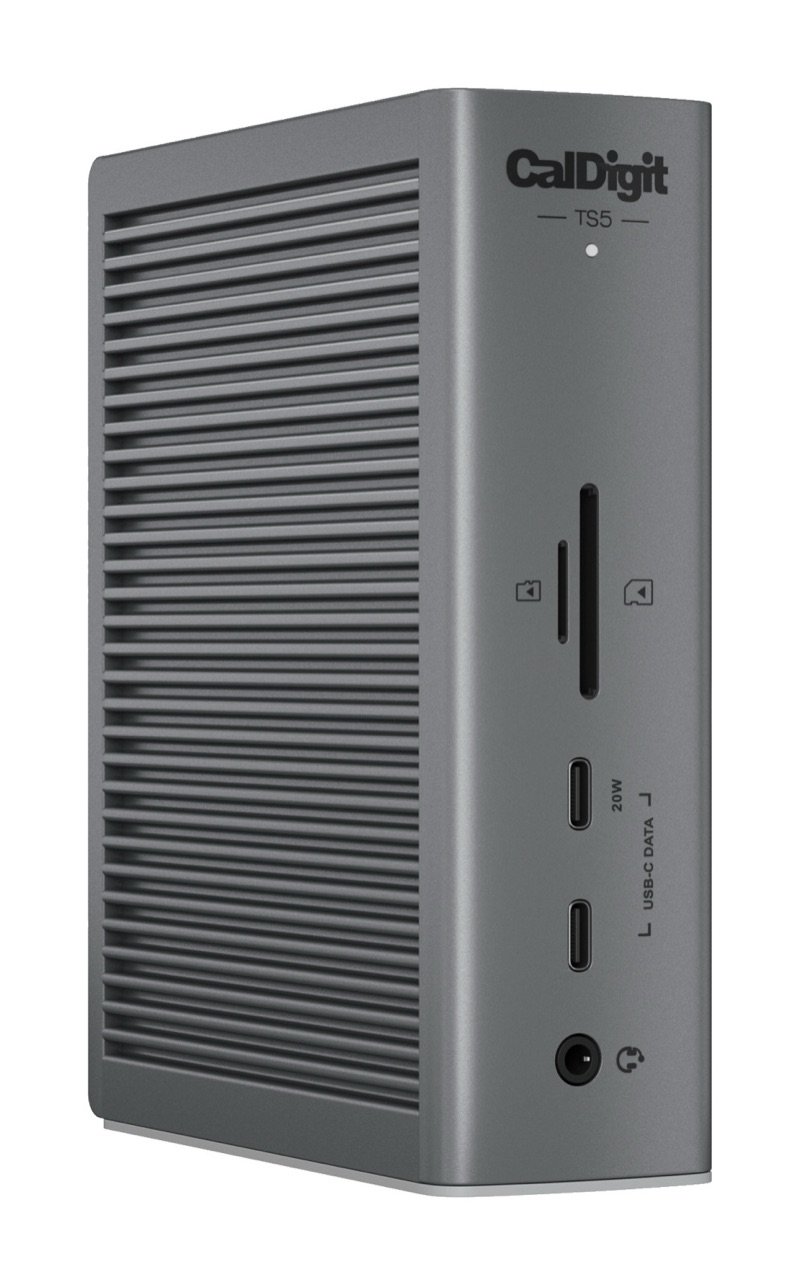
DrawingCheaperOWC 11-Port Thunderbolt DockCosts less, 3 spare Thunderbolt 4 ports, but 1 Gb LANCheck price on Amazon CalDigit TS4 Thunderbolt 4 dock in space gray, standing upright, with its front portsThis oneCalDigit TS4Many ports and a DisplayPort for a Thunderbolt 4 laptop, on one cableYou are here CalDigit TS5 Thunderbolt 5 dock in space gray, standing upright, with its front SD and microSD slots, two USB-C ports and audio jackBetterCalDigit TS5Thunderbolt 5 and 140 W, but no video port, 1 fast USB-ACheck price on Amazon
Spare Thunderbolt 4 ports32–
Ethernet1 Gb/s2.5 Gb/s–
Built-in video portNoneDisplayPort 1.4–
Laptop charging96 W98 W140 W
Link to the computer–40 Gb/s80 Gb/s
Fast USB-A ports–51
Oldest macOS–11.415
Drawing
Cheaper

OWC 11-Port Thunderbolt Dock

Costs less, 3 spare Thunderbolt 4 ports, but 1 Gb LAN

Spare Thunderbolt 4 ports
3
Ethernet
1 Gb/s
Built-in video port
None
Laptop charging
96 W
Link to the computer
–
Fast USB-A ports
–
Oldest macOS
–
Check price on Amazon
CalDigit TS4 Thunderbolt 4 dock in space gray, standing upright, with its front ports
This one

CalDigit TS4

Many ports and a DisplayPort for a Thunderbolt 4 laptop, on one cable

Spare Thunderbolt 4 ports
2
Ethernet
2.5 Gb/s
Built-in video port
DisplayPort 1.4
Laptop charging
98 W
Link to the computer
40 Gb/s
Fast USB-A ports
5
Oldest macOS
11.4
You are here

Thunderbolt 5 and 140 W, but no video port, 1 fast USB-A

Spare Thunderbolt 4 ports
–
Ethernet
–
Built-in video port
–
Laptop charging
140 W
Link to the computer
80 Gb/s
Fast USB-A ports
1
Oldest macOS
15
Check price on Amazon

You may also need

Active DisplayPort to HDMI adapter

Only for an HDMI screen: CalDigit says the DisplayPort needs an active adapter, and Macs stop at 4K 60 Hz over HDMI 1.

Longer certified Thunderbolt 4 cable

Only if the 0.8 m (2.6 ft) cable in the box is short; CalDigit says certified 2 m (6.6 ft) cables keep full speed 1.

Value check

Premium tier

The OWC 11-Port Thunderbolt Dock gives you one more spare Thunderbolt port for clearly less money 9. But it has 1 Gb Ethernet, no video port and half the USB ports 91.

Step up to the TS5 and, at CalDigit's own list prices, you pay only a little more 8. It adds Thunderbolt 5, 140 W charging and a third spare Thunderbolt port 8.

Prices change. See today's price on Amazon. We earn a commission on it. It costs you nothing extra.

Questions

Does the CalDigit TS4 have HDMI?

No. It has a DisplayPort 1.4, and the two spare Thunderbolt ports carry video too 1. Six of the 11 writers wished it had HDMI 162122232526.

For an HDMI screen, CalDigit says to use an active DisplayPort to HDMI adapter, or a USB-C to HDMI adapter 1. Macs give at most 4K 60 Hz over HDMI 1.

Why does the TS4 lose Ethernet or drives after sleep?

CalDigit points to firmware: its article on drop-outs after wake on Apple silicon Macs gives macOS Ventura plus firmware 39 or newer as the fix 3. The newest is 45.1; System Information shows yours under Thunderbolt/USB4 2. If Ethernet still drops, CalDigit's steps include turning off Energy Efficient Ethernet 4.

Does it charge my phone when no laptop is plugged in?

Yes. The front USB-A port, all three USB-C ports and two rear USB-A ports keep charging with no computer attached 1. The front USB-C port gives up to 20 W, which CalDigit says suits Apple's MagSafe charger; the others give 7.5 W 1.

How we made this pick32 sources · 39 owner comments · checked Nov 16, 2026 · we have not used itRead how

We have not used this product ourselves. This brief is built from the maker's specs and manual, expert tests and owner feedback. Sources are listed below.

32sources
39owner comments
Nov 16, 2026checked
See sources
  1. 1CalDigit TS4 Thunderbolt 4 Dock product page (specs, compare table, FAQ)Nov 16, 2026
  2. 2CalDigit: TS4 macOS firmware update procedures (modified 27 Jan 2026)Nov 16, 2026
  3. 3CalDigit: Thunderbolt dock sleep mode issues under macOS 12+ (1 Jul 2022)Nov 16, 2026
  4. 4CalDigit: Ethernet port on the TS4 or TS3 Plus does not work properlyNov 16, 2026
  5. 5CalDigit: MacBook multiple monitor support with CalDigit Thunderbolt docks (modified 3 Mar 2026)Nov 16, 2026
  6. 6Global Certification Corp. Certificate of Compliance, CalDigit TS4 (Report L180602, EN 62368-1:2014)Nov 16, 2026
  7. 7CalDigit TS4 230 W power supply dimension drawingNov 16, 2026
  8. 8CalDigit TS5 Thunderbolt 5 Dock product page (compare TS4, TS5 and TS5 Plus)Nov 16, 2026
  9. 9OWC 11-Port Thunderbolt Dock product page (cheaper option)Nov 16, 2026
  10. 10Apple Support: Fast charge your MacBook Air or MacBook Pro (5 Nov 2026)Nov 16, 2026
  11. 11Apple Support: How many displays can be connected to MacBook Air (10 Mar 2026)Nov 16, 2026
  12. 12Apple Support: Use dual monitors with MacBook Air and MacBook Pro with M3 chipNov 16, 2026
  13. 13Apple: MacBook Pro (14-inch, M4 Pro or M4 Max, 2024) Tech SpecsNov 16, 2026
  14. 14Apple: MacBook Pro (14-inch, M4, 2024) Tech SpecsNov 16, 2026
  15. 15Apple: MacBook Air (13-inch, M4, 2025) Tech SpecsNov 16, 2026
  16. 16Larry Jordan: CalDigit Thunderbolt Station 4 (TS4) dock, port and network speeds (Aug 2022, updated Nov 2022)Nov 16, 2026
  17. 17Windows Central: CalDigit TS4, the pinnacle of Thunderbolt 4 docking stations (Cale Hunt, 14 Mar 2022)Nov 16, 2026
  18. 189to5Mac: CalDigit TS4, the best Thunderbolt dock gets even better (Jeff Benjamin, 5 Mar 2022)Nov 16, 2026
  19. 19Macworld: CalDigit Thunderbolt Station 4, the ultimate Thunderbolt hub for your Mac (Glenn Fleishman, 4 Apr 2022)Nov 16, 2026
  20. 20PCWorld: Caldigit Thunderbolt Station 4 (TS4), one of the best (Simon Jary, 17 Oct 2023)Nov 16, 2026
  21. 21TechRadar: CalDigit Thunderbolt Station 4 (Mark Pickavance, 10 Jul 2023)Nov 16, 2026
  22. 22TechRadar: CalDigit TS4 Thunderbolt dock (Collin Probst, 9 Feb 2024)Nov 16, 2026
  23. 23MacRumors: CalDigit's Thunderbolt Station 4 offers 18 ports (Hartley Charlton, 15 Sep 2023)Nov 16, 2026
  24. 24Laptop Mag: CalDigit Thunderbolt Station 4 (Rael Hornby, 19 May 2023)Nov 16, 2026
  25. 25iMore: CalDigit TS4 Thunderbolt 4 dock, all the ports you could ever need (Gerald Lynch, 5 Jan 2023)Nov 16, 2026
  26. 26Creative Bloq: CalDigit Thunderbolt 4, the ultimate dock for your laptop? (Tom May, 21 Jun 2023)Nov 16, 2026
  27. 27Hacker News: owner comments on the CalDigit TS4 (2022-2026)Nov 16, 2026
  28. 28Framework Community: CalDigit TS4 owner posts (2022-2025)Nov 16, 2026
  29. 29MPU Talk (Mac Power Users forum): CalDigit TS4 threads (2022-2024)Nov 16, 2026
  30. 30Larry Jordan: owner comments under the TS4 articleNov 16, 2026
  31. 31CPSC recalls search (saferproducts.gov) for CalDigit, 16 Nov 2026Nov 16, 2026
  32. 329to5Mac: CalDigit TS4 Thunderbolt dock launches with 18 ports (8 Feb 2022)Nov 16, 2026

Update log

  • Nov 16, 2026 First version of this research brief.
How we research

Do you own it?

Tell other buyers how the CalDigit TS4 works for you.

How long have you owned it? (if you like)

Only your words, and how long you have owned it if you say. No name, no email, no cookie. Nothing shows here until we approve it. How we handle answers.

Did this help?

Related

More picks