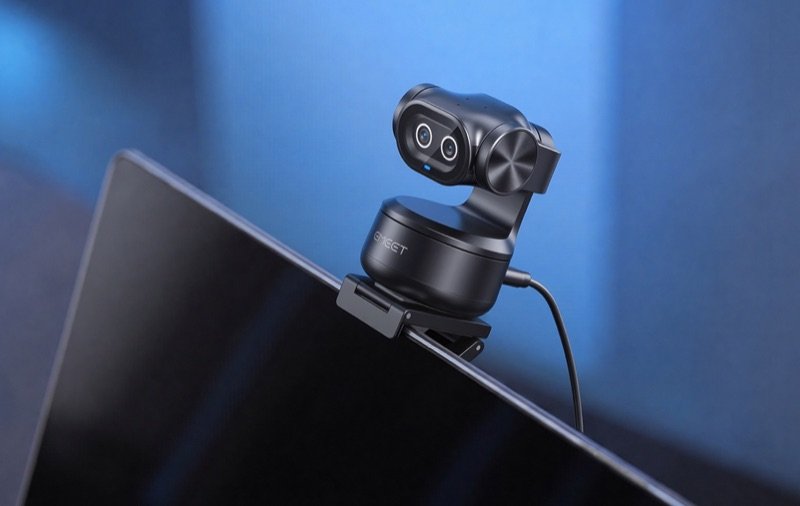
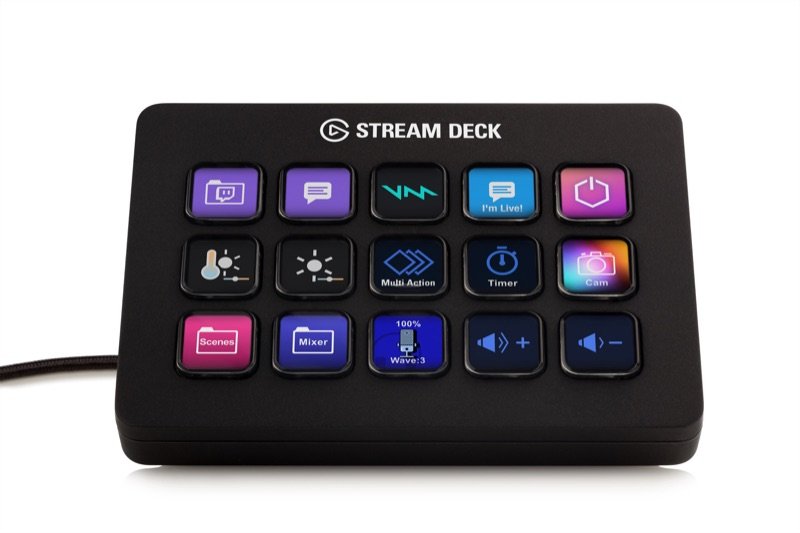
Elgato Stream Deck MK.2 in black from the front, its 15 keys lit with Elgato's demo icons
Photo: Elgato
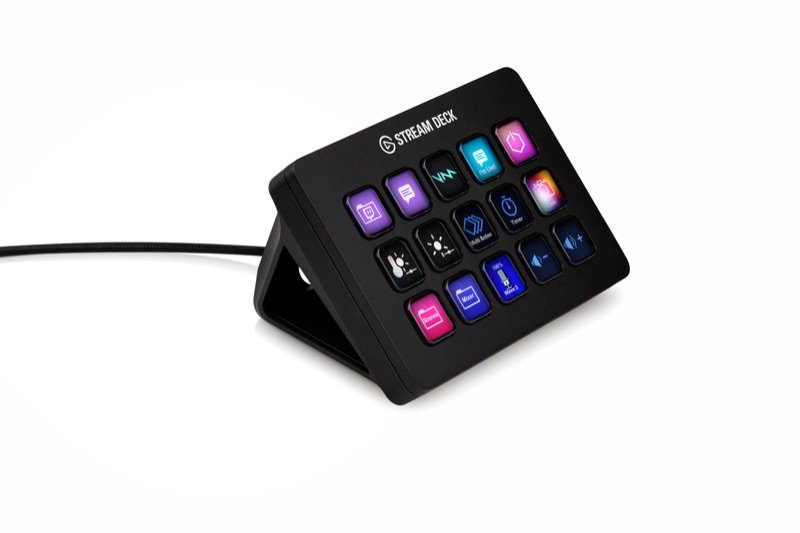
Elgato Stream Deck MK.2 on its stand with the cable attached
Photo: Elgato
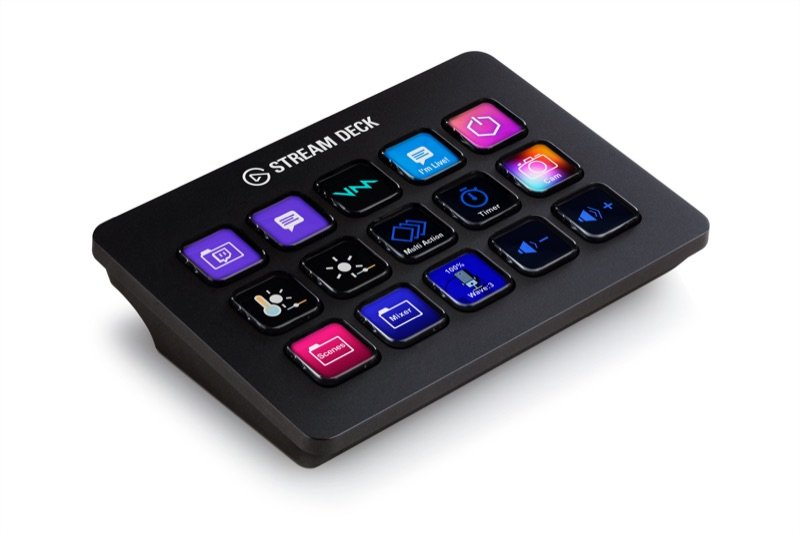
Elgato Stream Deck MK.2 lying flat, seen at an angle
Photo: Elgato
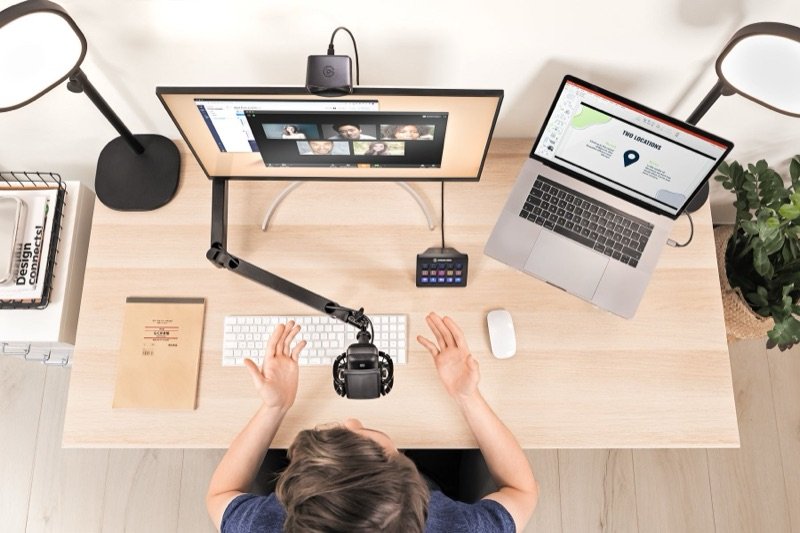
A desk from above: the Stream Deck MK.2 between a keyboard and a monitor
In use · Photo: Elgato
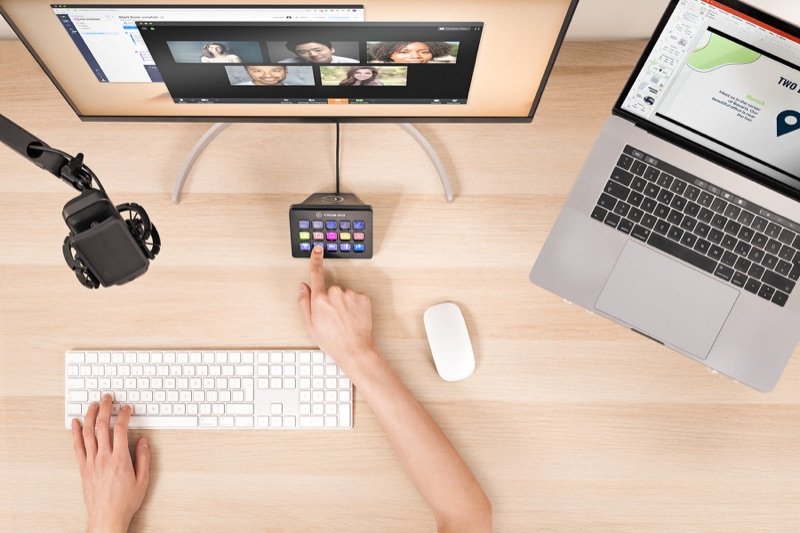
A hand pressing a key of the Stream Deck MK.2 on a desk, from above
In use · Photo: Elgato

Pick #40 · Keyboards & Mice

Elgato Stream Deck MK.2: Worth it if you never stream?

Good, with a catch

Great one-press shortcuts for Zoom, slides and apps; Teams users get plain hotkeys only, with no live mute light.

  • 1Free Elgato plugins for PowerPoint and Slack, as well as Zoom 4
  • 2A key fits only about 9 or 10 characters of text 11
  • 3Try the idea free: the phone app gives you 6 keys 7

We earn a commission if you buy through links on this page. It costs you nothing extra.

Good for

  • Zoom callers who want a mute key that shows its state
  • Repeat tasks: app launches, text snippets, slides
  • Mac or Windows 11 desks with a spare USB port

Not for

  • Your calls are on Teams and you want a live mute light
  • You run Windows 10 or Linux

Quick facts

15 LCD keyseach key shows its own icon
Zoom: livefree plugin shows mute state
Teams: hotkeysplugin removed Dec 2025
5.1 oz145 g; 9.5 oz (270 g) on stand
All specs that matter
Keys
15 LCD keys, 3 rows of 5Each shows its own icon; folders and profiles add more pages. 1
Key type
Classic (soft membrane)A scissor-key version sells beside it; Elgato says only the feel differs. 1
Size
4.6 × 3.3 × 1.0 in (118 × 84 × 25 mm)Without the stand; Tom's Hardware lists about 3 in (76 mm) tall on it 10. 1
Weight
5.1 oz (145 g); 9.5 oz (270 g) with standThe weighted stand helps it stay put when you press a key 10. 1
Connection
USB 2.0, USB-C port on the deckElgato lists a USB-C to USB-C cable, 59 in (150 cm); older boxes had USB-A 11. 1
Computer
Windows 11+ or macOS 13+Elgato's page lists nothing older, and Linux is not supported. 1
Software
Stream Deck app (free)Needed to set up keys; plugins come from Elgato's Marketplace with a free account 2. 1
Icon size
72 × 72 px per keyElgato's tip for sharp icons; text fits about 9 to 10 characters 11. 2

From the maker

Video: Elgato on YouTube

Elgato Stream Deck MK.2 Product TrailerPlays in YouTube's player. Nothing loads from YouTube until you tap.

What it does well

A shortcut you can see, not one you must remember

Each key shows what it does, so you press a picture instead of remembering a shortcut. The Elgato Stream Deck MK.2 has 15 keys in three rows of five 110. Each key is a small LCD screen that shows the icon or label you pick 110.

You set them up in Elgato's free Stream Deck app 5. One key can:

  • open an app
  • type a saved block of text
  • send a keyboard shortcut
  • run several steps in a row, which Elgato calls a Multi Action

Folders add more pages, and Smart Profiles swap the whole layout when you switch apps 5. XDA argues that a labelled key beats recalling a three-key shortcut in the middle of a task 16.

In 20 of 56 owner comments, people describe this kind of daily shortcut work, from launching apps to laying out windows 181920.
Zoom gets a free plugin with live mute status

On Zoom, a key can show you whether you are muted. Elgato's own Zoom plugin is free on its Marketplace (version 1.1.0.128, September 2026) 6. It puts these on keys 6:

  • mute
  • camera
  • screen share
  • leave
  • raise hand
  • reactions
  • recording
  • chat

The icons update live, so the mute key shows when you are muted 6. The plugin needs the Zoom Workplace desktop app 6.4 or newer and Stream Deck app 7.1 or newer 6. Tom's Hardware pointed to a Zoom plugin for camera and mute back in 2021 10.

In the owner comments, 4 people lean on a hardware mute key for calls 1920. But 2 of them built theirs with extra Mac automation software 1920.

Free plugins for slides, Slack and your morning routine

Slides and chat get free plugins too. Elgato lists free plugins for 4:

  • PowerPoint: next and previous slide, laser pointer, a presentation timer
  • Slack: open a channel or a direct message, pause notifications, set your status
  • world clocks
  • window placement
  • switching between a headset and speakers

Barry Collins of Big Tech Question does not stream. He runs slides from it and keeps a key that types an address 14. 9to5Toys set keys to switch sound between a mic and speakers on a Mac 13.

A start-of-day key can open your browser, chat and email in one press 5.

Quiet keys and a sturdier build than the first model

The keys are quiet enough for a shared room. Pocket-lint found they give a satisfying, silent click 15. Big Tech Question calls them soft and noiseless 14. Windows Central found them more tactile than the first Stream Deck 12.

The build moved on from that first model too. The MK.2 swapped its fixed cable for a detachable USB-C cable 1012. Its stand is one weighted piece set at about 45 degrees, with an anti-slip base 1012.

It has no battery, and the box holds no power adapter, just a USB cable 1. There are no US recalls on record at the CPSC for the Stream Deck, Elgato or Corsair 21.

You can try the idea for free first

Before you buy, you can test the idea on your phone. Elgato's Stream Deck Mobile app gives you 6 keys on a phone or tablet, free for good 7. A paid Pro tier unlocks up to 64 keys 7. It needs Wi-Fi and the desktop app 7.

Pocket-lint suggests the free app as a test before you spend on hardware 15. Once you own any Stream Deck, Virtual Stream Deck is free as well 1. It is a set of on-screen keys you click with the mouse 1.

What owners complain about

From 56 owner comments on 3 sites

3 of 6 expert write-ups

Costly for what keyboard shortcuts already do

If you never stream, it may cost more than it gives you. Three of six expert write-ups question the value. Laptop Mag calls it expensive and says that, outside streaming, it does nothing a few extra clicks cannot 11. Windows Central lists the cost as its main downside 12. Pocket-lint found it hard to justify unless you stream 15.

Two writers who do not stream disagree. Big Tech Question and 9to5Toys both rely on it every day at a Mac 1413. The owner comments mostly praise it, though several on Hacker News are developers who pair it with other automation tools 19.

TipTry 6 free keys in Stream Deck Mobile first 7. If a handful of keys is enough, the 8-key Stream Deck Neo costs less 8.

2 of 6 expert write-ups

Short labels and glossy keys

Labels must be short, and the glossy deck shows glare and dust. Laptop Mag found that a key fits only about 9 or 10 characters of text 11. The words also bend over the curved key face and look warped from the stand's angle 11.

Laptop Mag notes some glare on the keys 11. Pocket-lint calls the deck a dust magnet, and saw occasional visual glitches 15.

The feel comes down to taste. Two of 56 owners found the keys mushy or the build cheap 19. Windows Central and Pocket-lint liked the feel 1215.

TipUse icons instead of long titles: Elgato suggests 72 × 72 pixel images, and icon packs are on its Marketplace 2.

We earn a commission on these Amazon links. It costs you nothing extra.

Check price on Amazon

Will it control the apps you use for work?

Pick the one that fits you.

Pick the one that fits you.

Choose one to see the answer.

Yes, with a free pluginElgato's Zoom plugin: mute, camera, share, leave, with live status on the keys. Needs Zoom Workplace 6.4 or newer 6.
Hotkeys only, no live statusElgato's Teams plugin went in December 2025. Shortcut keys work only while Teams is the active window 317.
Yes, with free pluginsElgato lists free PowerPoint and Slack plugins for slides, channels and your status 4.
Not on Elgato's listElgato lists Windows 11 or newer and macOS 13 or newer; Linux is not supported 1.

Other options

We earn a commission on these Amazon links. It costs you nothing extra.

DrawingCheaperElgato Stream Deck Neo8 keys plus 2 touch points that flip pagesCheck price on Amazon Elgato Stream Deck MK.2 in black from the front, its 15 keys lit with Elgato's demo iconsThis oneElgato Stream Deck MK.2Keys that show their own icons, for one-press shortcuts in Zoom and slidesYou are here DrawingBetterElgato Stream Deck +Adds 4 dials and a touch strip, but has 8 keysCheck price on Amazon
Keys8158
Extra controls2 touch points + info barnone–
StandBuilt in, 3 positionsremovable–
Cable3 ft5 ft (0.9 m vs 1.5 m)–
Dials–none4
Touch strip–noYes
Weight–0.6 lb (465 g vs 270 g)1 lb
Drawing
Cheaper

Elgato Stream Deck Neo

8 keys plus 2 touch points that flip pages

Keys
8
Extra controls
2 touch points + info bar
Stand
Built in, 3 positions
Cable
3 ft
Dials
–
Touch strip
–
Weight
–
Check price on Amazon
Elgato Stream Deck MK.2 in black from the front, its 15 keys lit with Elgato's demo icons
This one

Elgato Stream Deck MK.2

Keys that show their own icons, for one-press shortcuts in Zoom and slides

Keys
15
Extra controls
none
Stand
removable
Cable
5 ft (0.9 m vs 1.5 m)
Dials
none
Touch strip
no
Weight
0.6 lb (465 g vs 270 g)
You are here
Drawing
Better

Elgato Stream Deck +

Adds 4 dials and a touch strip, but has 8 keys

Keys
8
Extra controls
–
Stand
–
Cable
–
Dials
4
Touch strip
Yes
Weight
1 lb
Check price on Amazon

You may also need

A free USB port, or the right cable

Elgato lists a USB-C to USB-C cable; earlier boxes had USB-C to USB-A 111. Plug it straight into the computer 2.

A free Elgato Marketplace account

Plugins such as Zoom install from Elgato's Marketplace once you sign in through the app 26.

Value check

Mid-range tier

With 8 keys and two touch points that flip pages, the Stream Deck Neo covers everyday shortcuts for less 8. It shows fewer actions at once, though 18.

The Stream Deck + costs more and adds four dials and a touch strip, for volume and zoom 95. Tom's Hardware wished the MK.2 had such a dial 10. Yet the + has only 8 keys 9.

Prices change. See today's price on Amazon. We earn a commission on it. It costs you nothing extra.

Questions

Does the Stream Deck MK.2 still work with Microsoft Teams?

Only through keyboard shortcuts. Elgato removed its Teams plugin in December 2025 after Microsoft retired the API it used, so keys can no longer show live mute or camera status 317. You can still map Teams shortcuts such as Ctrl+Shift+M (mute) and Ctrl+Shift+O (camera), but they work only while Teams is the active window 3.

Does Elgato's app have to stay open?

You set up every key in the free Stream Deck app, which needs Windows 11 or macOS 13 or newer 1. One owner says the keys do nothing unless the app is running, and finds it heavy on a work laptop 19. Another swapped it for other software to avoid the load 19.

Can I try a Stream Deck before buying one?

Yes. Stream Deck Mobile is free with 6 keys on a phone or tablet, for good, and a paid Pro tier unlocks up to 64 keys 7. It needs Wi-Fi and the desktop app 6.3 or newer 7. Pocket-lint suggests it as a test before buying hardware 15.

Classic or scissor keys: which one should I get?

Elgato says the only difference is the feel: classic keys use a soft, cushioned membrane, while scissor keys are crisper and even wherever you press 1. Only the classic models, like this MK.2, take Elgato's removable magnetic faceplates 1. Windows Central and Pocket-lint both liked the classic keys' tactile, quiet press 1215.

Is it worth upgrading from the original Stream Deck?

Probably not. The MK.2 went on sale in July 2021 22. Tom's Hardware, Windows Central and Big Tech Question all found the same 15 keys and the same software 101214. The main changes are a detachable USB-C cable, a sturdier fixed stand and faceplates 101214. If you do switch, Big Tech Question notes that your key layouts carry over 14.

How we made this pick22 sources · 56 owner comments · checked Nov 16, 2026 · we have not used itRead how

We have not used this product ourselves. This brief is built from the maker's specs and manual, expert tests and owner feedback. Sources are listed below.

22sources
56owner comments
Nov 16, 2026checked
See sources
  1. 1Elgato US shop: Stream Deck (MK.2, black, 10GBA9901)Nov 16, 2026
  2. 2Elgato Explorer: Stream Deck Quick Start GuideNov 16, 2026
  3. 3Elgato Explorer: Control Microsoft Teams with Stream Deck (5 May 2026)Nov 16, 2026
  4. 4Elgato Explorer: Best Stream Deck Plugins for Productivity (8 May 2026)Nov 16, 2026
  5. 5Elgato Explorer: How to be more productive with Stream Deck (7 Aug 2026)Nov 16, 2026
  6. 6Elgato Marketplace: Zoom plugin by Elgato (v1.1.0.128, 22 Sep 2026)Nov 16, 2026
  7. 7Elgato: Stream Deck MobileNov 16, 2026
  8. 8Elgato US shop: Stream Deck Neo (10GBJ9901) (cheaper option)Nov 16, 2026
  9. 9Elgato US shop: Stream Deck + (10GBD9901) (better option)Nov 16, 2026
  10. 10Tom's Hardware: Elgato Stream Deck MK.2 (Junae Benne, 21 Aug 2021)Nov 16, 2026
  11. 11Laptop Mag: Elgato Stream Deck MK.2 (Rami Tabari, 9 Oct 2021)Nov 16, 2026
  12. 12Windows Central: Elgato Stream Deck MK.2 (Harish Jonnalagadda, 11 Oct 2021)Nov 16, 2026
  13. 139to5Toys: Elgato Stream Deck MK.2 for Mac productivity (Rikka Altland, 17 Feb 2022)Nov 16, 2026
  14. 14Big Tech Question: Stream Deck MK.2, should non-streamers buy one? (Barry Collins, 25 Feb 2022)Nov 16, 2026
  15. 15Pocket-lint: The Elgato Stream Deck Mk.2 is cool, but do I really need it? (Bon Adamson, 27 Aug 2024)Nov 16, 2026
  16. 16XDA: Using a Stream Deck for productivity is better than using it for streaming (25 Jan 2026)Nov 16, 2026
  17. 17MakeUseOf: Microsoft just killed this Teams integration without telling anyone (13 Aug 2026)Nov 16, 2026
  18. 18elgato.com owner posts in the Stream Deck page dataNov 16, 2026
  19. 19Hacker News comments by Stream Deck owners (2020-2026)Nov 16, 2026
  20. 20Mac Power Users forum: Stream Deck? Is it useful? (May 2021)Nov 16, 2026
  21. 21CPSC recall search (saferproducts.gov): Elgato, Stream Deck, CorsairNov 16, 2026
  22. 22Shacknews: Elgato's Stream Deck MK.2 is now available (15 Jul 2021)Nov 16, 2026

Update log

  • Nov 16, 2026 First version of this research brief.
How we research

Do you own it?

Tell other buyers how the Elgato Stream Deck MK.2 works for you.

How long have you owned it? (if you like)

Only your words, and how long you have owned it if you say. No name, no email, no cookie. Nothing shows here until we approve it. How we handle answers.

Did this help?

More picks