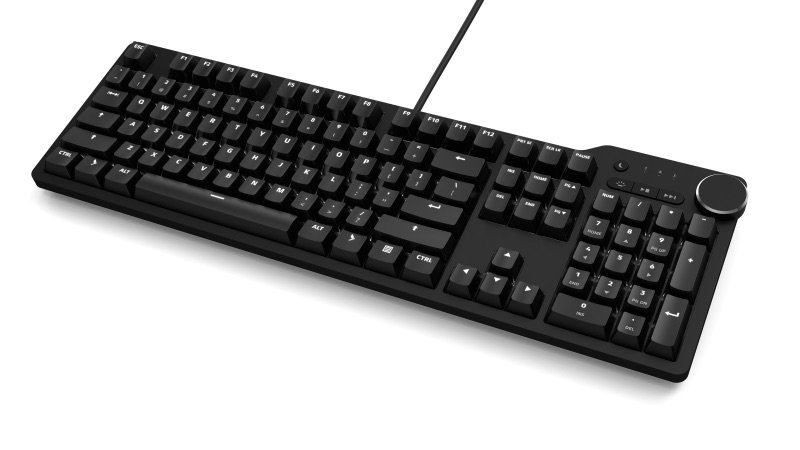
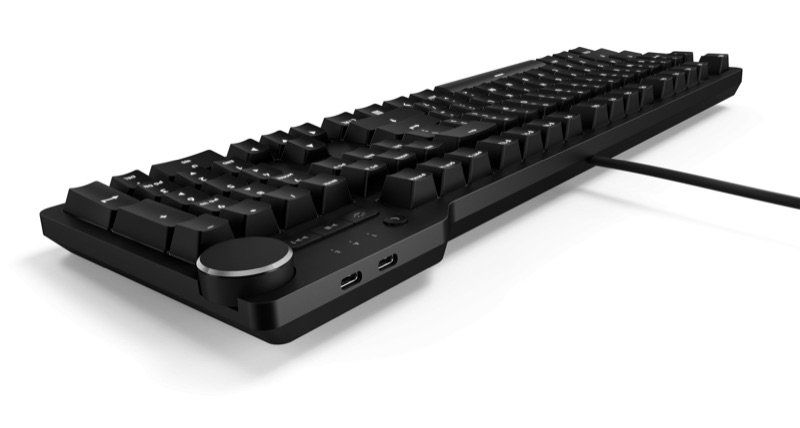
Das Keyboard 6 Professional, a black full-size keyboard with US keys and a volume knob, seen from the front right
Photo: Das Keyboard
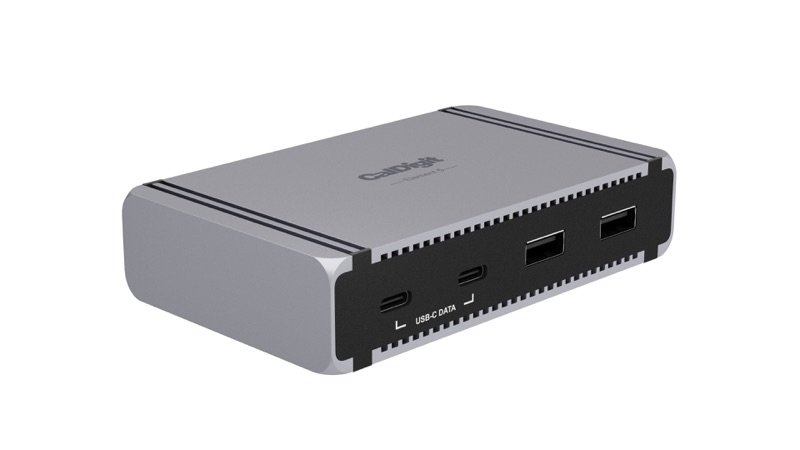
Back of the Das Keyboard 6 Professional, with two USB-C ports beside the volume knob
Photo: Das Keyboard
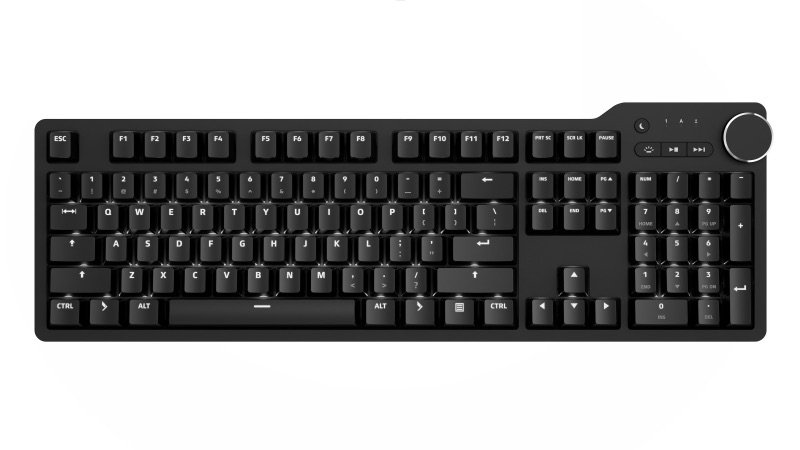
Das Keyboard 6 Professional from above: the full US layout with number pad and media keys
Photo: Das Keyboard
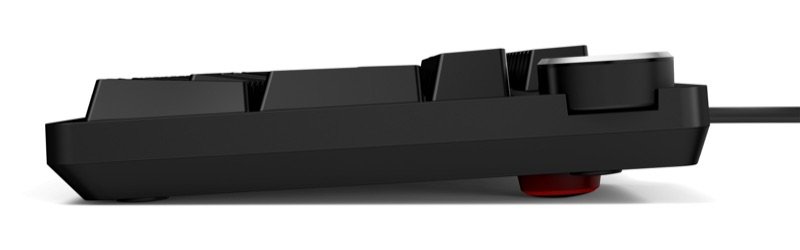
Das Keyboard 6 Professional from the side, with a screw-on foot under the back
Photo: Das Keyboard

Pick #28 · Keyboards & Mice

Das Keyboard 6 Professional: Worth it for a work PC in 2026?

Good, with a catch

A solid wired typist's board with a two-port USB-C hub, but no remapping, a fixed cable and ABS keycaps.

  • 1Works with no app or driver, so it suits a locked-down work computer 1216
  • 2No remapping or macros, and the cable is fixed 1217
  • 3PC Gamer found its ABS keycaps feel cheaper than PBT 13

We earn a commission if you buy through links on this page. It costs you nothing extra.

Good for

  • PC typists who want a volume knob and USB-C ports in reach
  • Work PCs where you cannot install keyboard software
  • One plain white backlight instead of RGB and apps

Not for

  • You want remapping, macros or wireless
  • You want PBT keycaps or switches you can swap

Quick facts

2 × USB-Chub ports, up to 5 Gbps
55 cNMX Brown force (maker)
2.89 lb1.31 kg, full size
6.6 ft2 m cable, not removable
All specs that matter
Switches
Cherry MX Brown or MX Blue, not hot-swappableBrown is a soft bump, Blue a loud click; no swapping later. 16
Switch force (Das)
Brown 55 cN, Blue 60 cN; 4 mm (0.16 in) travelHow hard you press to type, by Das's own figures. 1
USB-C hub
2 ports, superspeed (up to 5 Gbps)Full speed needs a high-speed USB port 16; no USB-A port 12; Das gives no charging figure 1. 19
Cable
2 m (6.6 ft), fixed, USB-C plugNo swapping it for a shorter one, or replacing it if it frays; a USB-A adapter is in the box 1. 17
Keycaps
Laser-etched ABS, standard Cherry MX stemsPBT tends to outlast ABS, says How-To Geek 17; any MX keycap set fits if you want PBT later. 1
Software
None: no remapping, no macrosNothing to install, but nothing to change either. 12
Backlight
White only, dimmable in stepsWriters counted 3 to 7 steps 1816; no colors and no lighting app. 14
Size and weight
17.5 × 5.31 × 1.17 in (44.5 × 13.5 × 3.0 cm), 2.89 lbFull size with a number pad; 2.89 lb is 1.31 kg. 1
Warranty
1-year limited hardware warranty from Das Keyboard; a 3-year extension is sold for eligible new keyboards. After the first 30 days, an approved claim gets a Certified Refurbished unit, not a new one.4

What it does well

A USB-C hub where your hands are

Your mouse, mic or a drive can plug straight into the keyboard. The Das Keyboard 6 Professional is a full-size wired board with two USB-C ports at the back, next to its big volume knob 1.

Das calls it a superspeed hub 1, and The Gadgeteer's 2024 piece gives it up to 5 Gbps for data 19. Digital Trends ran a microphone and a mouse from them 15, and 3 of the 12 owners find the hub handy 2022.

Two limits: full speed needs a high-speed USB port on the computer 16, and Das gives no charging figure 1.
Works with no app and no driver

Nothing needs installing, so it suits a locked-down work computer. Plug it in and the knob, media buttons and sleep key work at once 1216. It needs one USB port, USB-C or USB-A, and a USB-A adapter is in the box 1.

Das lists full n-key rollover, so every key you press at once counts 1. TrustedReviews saw no ghosting or stray key presses in a couple of weeks of use 16. Three of 12 owners like that it has no software or extras 20.

Heavy and stiff, with two fit caveats

Expect a heavy, rigid board. It weighs 2.89 lb (1.31 kg) under an aluminum top 1. PC Gamer found no flex in the deck 13, and five of 12 owners call it solid or well made 20.

Two caveats. The underside is plastic 16. And three of the eight expert units had a fit flaw. One arrived with a popped top cover 18 and another with a corner not flush 19. A third had its rear plate pop out in use 16. Check the edges and ports when yours arrives.

Das Keyboard had no recalls in the CPSC's files as of 16 Nov 2026 23.

Cherry switches, in two flavors

The Brown switches get steady praise for how they type. TechRadar, PC Gamer, Windows Central and How-To Geek all like the Brown feel 12131417. Among owners, 4 of 12 like the feel too 20, and one more names it a favourite keyboard 21.

You choose Cherry MX Brown (a soft bump, no click) or Cherry MX Blue (an audible click) 13. Das's figures (cN measures how hard you press) 1:

  • Brown: 55 cN 1
  • Blue: 60 cN 1
  • travel: 4 mm (0.16 in) 1

Cherry rates its MX2A Brown at 55 cN and over 100 million presses 11. But Das's page calls the Brown "MX2A" in one place and "MX" in another 1. PC Gamer's 2024 unit had first-generation MX Browns 13. Das does not say which a new unit has.

A clean white backlight

You get one even white light and no app to fuss with. Every key is lit through its letters 1, and a button by the knob sets the brightness 16. Das gives no step count, and writers counted from three to seven levels 181614. How-To Geek found the light even from key to key 17.

Six of the 12 owners praise it 20. There are no colors and no lighting app 1416; Das's 5QS Mark II has both 25.

What owners complain about

From 12 owner comments on 3 sites

2 of 12 owners

The feet give little tilt and can loosen

There is little tilt, and the feet can work loose. One owner wanted longer feet for a steeper angle; another says the screw-on feet wind themselves in 20. Windows Central also wished for more incline 14.

The feet add only about 0.2 in (5 to 6 mm) 118:

  • Das: 1.17 in (3.0 cm) flat, 1.378 in (3.5 cm) with feet 1
  • The Gadgeteer: up to 5.9 mm from the feet 18

Treat these owner counts as rough: 10 of the 12 owners posted on one UK store's page, and 7 of them already owned a Das 20.

TipOne owner says a drop of thread lock keeps the feet in place 20. The board also lies flat without them 1.

1 of 12 owners

The feel and sound do not suit everyone

Not everyone likes how it sounds and feels. One owner typed on it, disliked both, and put it away 22. That is a single report. Still, TrustedReviews found the Brown keys wobble a little, and the board needlessly loud in a quiet room 16. PC Gamer found the ABS plastic keycaps feel cheaper than PBT ones 13.

Others liked the feel: TechRadar, PC Gamer and How-To Geek 121317. The switches are not hot-swappable, so you cannot change them later 16.

TipPick Brown for a shared room: Das calls it a quiet bump 3. For a squeaky long key, Das says to grease the stabilizer bar 10.

We earn a commission on these Amazon links. It costs you nothing extra.

Check price on Amazon

Will its two USB-C ports do what I need?

Pick what you would plug into the keyboard.

Pick what you would plug into the keyboard.

Choose one to see the answer.

Yes, that is what they are forUp to 5 Gbps, says The Gadgeteer 19, from a high-speed USB port on the PC 16; 3 of the 12 owners find the ports handy 2022.
Not without an adapterBoth ports are USB-C; the older 4 Professional had USB-A ones 121. TrustedReviews says they do not suit USB-A receivers 16.
Unclear: reports differDas gives no watt figure 1. How-To Geek says the ports will not quick-charge 17; TrustedReviews says they can on a modern PC 16.
Keyboard yes, ports slowerDas asks only for one USB-C or USB-A port 1, but TrustedReviews says the ports need a high-speed USB port for full speed 16.

Other options

We earn a commission on these Amazon links. It costs you nothing extra.

DrawingCheaperDas Keyboard 4 Professional (MX Brown)Same knob and 5 Gb/s hub, USB-A ports, but no backlightCheck price on Amazon Das Keyboard 6 Professional, a black full-size keyboard with US keys and a volume knob, seen from the front rightThis oneDas Keyboard 6 ProA wired typist's keyboard with a volume knob and USB-C ports in reachYou are here DrawingBetterDas Keyboard 5QS Mark II (MX2A Brown)Pre-lubed MX2A switches, foam and software; no USB hubCheck price on Amazon
SwitchesMX Brown or BlueMX Brown or BlueMX2A, pre-lubed
USB hub2 × USB-A2 × USB-CNone listed
SoftwareNone listedNoneQ software
BacklightNone listedWhiteNot stated
Drawing
Cheaper

Das Keyboard 4 Professional (MX Brown)

Same knob and 5 Gb/s hub, USB-A ports, but no backlight

Switches
MX Brown or Blue
USB hub
2 × USB-A
Software
None listed
Backlight
None listed
Check price on Amazon
Das Keyboard 6 Professional, a black full-size keyboard with US keys and a volume knob, seen from the front right
This one

Das Keyboard 6 Pro

A wired typist's keyboard with a volume knob and USB-C ports in reach

Switches
MX Brown or Blue
USB hub
2 × USB-C
Software
None
Backlight
White
You are here
Drawing
Better

Das Keyboard 5QS Mark II (MX2A Brown)

Pre-lubed MX2A switches, foam and software; no USB hub

Switches
MX2A, pre-lubed
USB hub
None listed
Software
Q software
Backlight
Not stated
Check price on Amazon

You may also need

USB-C to USB-A adapter, for dongles

Only if you plug a USB-A receiver into the keyboard: both hub ports are USB-C 116.

A wrist rest, if you want one

None comes in the box 17; the board stands 1.17 in (3.0 cm) tall, 1.378 in (3.5 cm) on its feet 1.

Value check

Premium tier

The Das Keyboard 4 Professional costs a little less and has no backlight 2412. It keeps the knob and a 5 Gb/s hub, with USB-A ports 2412.

The 5QS Mark II costs a little more. It adds pre-lubed MX2A switches, foam and remapping software, but Das lists no USB hub on it 25.

Prices change. See today's price on Amazon. We earn a commission on it. It costs you nothing extra.

Questions

What changed from the Das Keyboard 4 Professional?

The 6 Pro, announced in September 2022, adds a white backlight, a USB-C cable and two USB-C hub ports where the 4 Pro has USB-A ports, and screw-on feet instead of a ruler footbar 21224. TechRadar found the layout, knob, media keys and sleep key nearly the same 12. Das still sells the 4 Pro, for a little less 24.

Can I remap keys or change what the knob does?

No. There is no software, no macros and no key mapping, and the knob only sets volume (press to mute) 1213161. Das support calls the right logo key a function key "reserved for future use"; the product page says it acts as FN but lists no FN functions 81.

Brown or Blue switches for a shared office?

Das describes Brown as a quiet bump and Blue as a loud click 3. Digital Trends would pick Brown for office use 15, though TrustedReviews found its Brown unit noisy in a quiet room 16. Choose once: the switches are not hot-swappable 16.

Does the Das Keyboard 6 Professional work on a Mac?

It has a PC layout, but Das says a Mac recognizes its PC keyboards; you swap Option and Command under System Settings, Keyboard, Modifier Keys 9. The Gadgeteer used one on a Mac 19. The firmware updater runs on Windows only 7.

Is the warranty valid if I buy it on Amazon?

Das lists Amazon in the US as an authorized retailer, and units from authorized sellers get its 1-year limited warranty 54. Units from unauthorized sellers are not covered, so check who the seller is 6.

How we made this pick25 sources · 12 owner comments · checked Nov 16, 2026 · we have not used itRead how

We have not used this product ourselves. This brief is built from the maker's specs and manual, expert tests and owner feedback. Sources are listed below.

25sources
12owner comments
Nov 16, 2026checked
See sources
  1. 1Das Keyboard 6 Professional product pageNov 16, 2026
  2. 2Das Keyboard press kit page (release list and photo permission)Nov 16, 2026
  3. 3Das Keyboard switch comparison guideNov 16, 2026
  4. 4Das Keyboard warranty and return policyNov 16, 2026
  5. 5Das Keyboard: Where to buy (authorized retailers)Nov 16, 2026
  6. 6Das Keyboard: Unauthorized dealer warningNov 16, 2026
  7. 7Das Keyboard support: Update firmware on the Das Keyboard 6 ProfessionalNov 16, 2026
  8. 8Das Keyboard help center: What the keys with a Das Keyboard icon do on the 6 ProNov 16, 2026
  9. 9Das Keyboard support: Configuring Control, Option and Command keys for MacNov 16, 2026
  10. 10Das Keyboard support: One of my keys is squeakingNov 16, 2026
  11. 11CHERRY MX2A Brown switch page (switch maker)Nov 16, 2026
  12. 12TechRadar: Das Keyboard 6 Professional (John Loeffler, 15 Mar 2023)Nov 16, 2026
  13. 13PC Gamer: Das Keyboard 6 Professional (Reece Bithrey, 20 Mar 2024)Nov 16, 2026
  14. 14Windows Central: Das Keyboard 6 Professional (Rebecca Spear, 23 Sep 2023)Nov 16, 2026
  15. 15Digital Trends: Das Keyboard 6 Professional (David Matthews, 14 Oct 2022)Nov 16, 2026
  16. 16TrustedReviews.com: Das Keyboard 6 Professional (Joshua Brown, 7 Feb 2024)Nov 16, 2026
  17. 17How-To Geek: Das Keyboard 6 Pro (Napier Lopez, 27 Oct 2022)Nov 16, 2026
  18. 18The Gadgeteer: Das Keyboard 6 Professional (Matt Gregersen, 30 Nov 2022)Nov 16, 2026
  19. 19The Gadgeteer: Das Keyboard 6 Professional (Zack Chongulia, 14 Aug 2024)Nov 16, 2026
  20. 20The Keyboard Company (UK) owner posts: Das 6 Professional (10 buyers, May 2024 to Dec 2025)Nov 16, 2026
  21. 21Hacker News: owner comment naming the Das Keyboard 6 Pro a favourite (29 Dec 2024)Nov 16, 2026
  22. 22Lemmy (midwest.social): owner comment on the Das Keyboard 6 Pro (22 Jan 2024)Nov 16, 2026
  23. 23CPSC recalls search (saferproducts.gov) for Das Keyboard, 16 Nov 2026Nov 16, 2026
  24. 24Das Keyboard 4 Professional product page (cheaper option)Nov 16, 2026
  25. 25Das Keyboard 5QS Mark II product page (better option)Nov 16, 2026

Update log

  • Nov 16, 2026 Rewritten to be easier to read, with the same facts and sources; added a side-by-side table of the two alternatives.
  • Nov 16, 2026 Sources checked again.
  • Nov 16, 2026 First version of this research brief.
How we research

Do you own it?

Tell other buyers how the Das Keyboard 6 Pro works for you.

How long have you owned it? (if you like)

Only your words, and how long you have owned it if you say. No name, no email, no cookie. Nothing shows here until we approve it. How we handle answers.

Did this help?

More picks