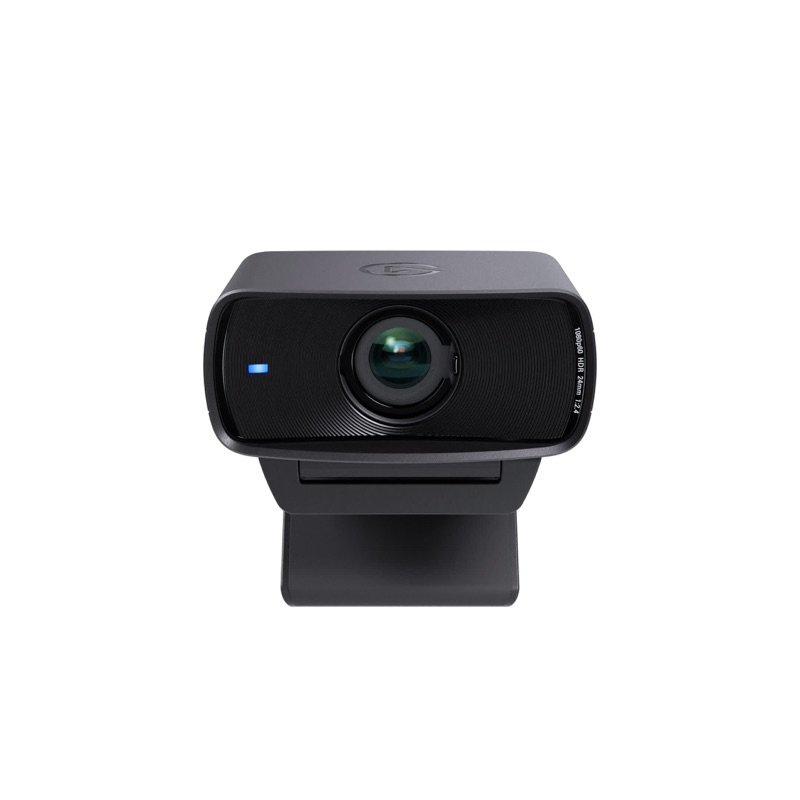
Elgato Facecam MK.2 webcam in black, from the front, with its privacy shutter open
Photo: Elgato
Elgato Facecam MK.2 from the front with its privacy shutter closed over the lens
Photo: Elgato
Elgato Facecam MK.2 from the side, with its USB-C cable and monitor clip
Photo: Elgato
Elgato Facecam MK.2 clipped on top of a white monitor in a calm room
In use · Photo: Elgato
A desk setup with the Facecam MK.2 on top of a monitor, a laptop and a key light
In use · Photo: Elgato

Pick #19 · Video Calls & Audio

Elgato Facecam MK.2: Worth it without a mic or autofocus?

Good, with a catch

Set it once and it stays that way: fixed focus, saved settings, no mic, and it wants a well-lit desk.

  • 1Settings you save stay on the camera, even on another computer 1
  • 2Add a light: 4 of 6 experts found it grainy until tuned 1491210
  • 3Blur, tracking and eye contact need an Nvidia RTX card on Windows 119

Good for

  • Desk calls when you already own a mic or headset
  • Manual control that stays saved on the camera
  • PCs and Macs with a free USB 3.0 port

Not for

  • You need a built-in mic or close-up autofocus
  • Your room is dim and you won't add a light

Quick facts

1080p60uncompressed on USB 3.0
30–120 cmfixed focus (12–47 in)
No micbring a mic or headset
3.2 oz90 g, without the mount
All specs that matter
Video
1080p60/30; 720p and 540p up to 120 fpsUncompressed on USB 3.0; on USB 2.0 it falls back to compressed MJPEG. 1
Sensor
Sony STARVIS CMOS, 1/2.5 inSmaller than the Facecam 4K's 1/1.8 in sensor 7; light still matters a lot. 1
Lens
24 mm equivalent, f/2.4, 84° diagonalWide enough for a desk; zoom in the app to frame tighter. 2
Focus
Fixed, 30–120 cm (11.8–47.2 in)Sharp from keyboard distance to about 4 ft; soft closer than 12 in. 2
HDR
Yes; Elgato's pages differ on 30 or 60 fpsThe shop page says 1080p30; the launch release says 60 fps 3. PC Gamer found HDR is off at 720p120 11. 1
Microphone
NoneElgato left it out on purpose; plan on a mic or headset. 1
Box cable
USB-C to USB-C, 180 cm (Elgato's shop page)The same page also lists USB-A to USB-C, 200 cm, and 2024 boxes had USB-A 9. 1
Size and weight
3.3 × 1.5 × 2.4 in (84 × 38 × 61 mm), 3.2 oz (90 g)Without the clip; Windows Central gives 136 g (4.8 oz) with it 13. 2

What it does well

A clear picture in a well-lit room

In a well-lit room, the picture is clear and detailed. TrustedReviews found good detail in good light 14. PC Gamer liked how HDR kept a bright window from washing out the picture 11, and Windows Central found it strong even with its backlights off 13.

Not everyone was impressed. In Tom's Hardware's set lighting, the image was on a par with cheaper 1080p webcams 9.
Fixed focus that never hunts

You stay sharp anywhere from 30 to 120 cm (11.8 to 47.2 in) away 2. Elgato puts it as your keyboard to about 4 ft (1.2 m) 1. Because the focus is fixed, it never pulses in and out when you lean back or wave your hands. PC Gamer and GamesRadar both count that as a plus 1112.

The flip side: anything closer than 30 cm (11.8 in) goes soft 2.

Your settings live on the camera

Set exposure, white balance and framing once in Elgato's app, then save. The settings stay in the camera's own memory, even after a restart or on another computer 1. Tom's Guide found its saved look carried over to a Chromebook, where the app does not run 10. Tom's Hardware calls on-camera memory a rare feature in a webcam 9.

This matters more now. Elgato stopped updating its Camera Hub app in November 2026 and moved to Studio 2.0, which needs Windows 11 5.

Camera-style manual control

The app gives you the controls of a real camera 19:

  • ISO and shutter speed
  • white balance with tint
  • HDR
  • noise reduction in three levels (2D, 3D or both)

You can also zoom, pan and tilt by cropping, and save framing presets 3. GamesRadar and Tom's Guide both got their best picture by setting these by hand 1210.

HDR splits opinion. PC Gamer liked it with bright windows 11. Tom's Hardware and GamesRadar found it noisier or dimmer and mostly left it off 912.

Built-in shutter and a low monitor clip

A shutter slides over the lens, so there is no cap to lose 1. The clip sits low on the monitor, and Tom's Hardware found the camera tilts forward up to 90 degrees on it 9. Under the clip is a standard 1/4 in tripod thread 1.

It runs on USB power, and the US recall database (CPSC) lists no recall for Elgato or Corsair 16. One catch: the shutter is fiddly to move (see below).

Known problems

From expert tests.

5 of 6 expert write-ups

AI extras are hit and miss and need Nvidia

Background blur, face tracking and eye contact need an Nvidia RTX graphics card on Windows. PC Gamer could not turn them on with an Intel Arc card 11, and Tom's Hardware notes that some need Nvidia's AR SDK 9.

Where they ran, results were mixed. Tom's Guide saw artifacts around moving hands, and eye-contact glitches about a quarter of the time 10. TrustedReviews saw clipping on some AI backgrounds 14, and Windows Central found head tracking a little jerky 13.

TipSkip the extras: the camera works with no app, and settings you save on it carry over to any computer 1.

4 of 6 expert write-ups

Grain and dull auto settings unless you tune it

Left on auto, the picture can look dull or grainy. TrustedReviews found low light reddish and noisy by default 14. Tom's Hardware found the auto exposure leaning dark, and the picture noisy with noise reduction off, even in a bright room 9. GamesRadar and Tom's Guide both got a better picture by hand than from the auto modes 1210.

Not everyone saw grain: Tom's Guide and Windows Central praised its low-light picture 1013.

TipAdd a small light at face level, as Elgato advises 4, then set ISO, shutter and white balance by hand and save them to the camera 112.

4 of 6 expert write-ups

A fiddly privacy shutter

The shutter is built in, but four of the six expert write-ups found it awkward. Tom's Hardware found it stiff and hard to catch without nails 9, and Windows Central agreed 13. PC Gamer called its tab small 11.

GamesRadar warns that you push the shutter itself, so it is easy to smudge the lens 12.

TipIf you do touch the lens, clean it only with a microfiber cloth, as Elgato's guide says 2.

Will it work well on my desk and computer?

Pick the one that fits you.

Pick the one that fits you.

Choose one to see the answer.

Yes, uncompressed 1080p60Plug it straight into a USB 3.0 port, not a hub 2. Check the box cable: Elgato lists USB-C to USB-C; 2024 boxes had USB-A 19.
Works, but compressedOn USB 2.0 it sends compressed MJPEG video 1. Elgato notes most meeting apps cap video at 1080p anyway 4.
Camera yes, newest app noThe camera works without an app 1. Elgato's app now lists Windows 11 and macOS 13.3 or newer 1; Studio 2.0 needs Windows 11 5.
Not sharp up closeFocus is fixed at 30–120 cm (11.8–47.2 in) 2. To show items near the lens, pick an autofocus camera such as the C920s 8.

Real size

Bank card
3.3 in1.5 in
This webcam

1.5 × 3.3 × 2.4 inTall × wide × thick (3.8 × 8.4 × 6.1 cm), next to a bank card.

Other options

DrawingCheaperLogitech C920s Pro HDAdds stereo mics and autofocus, but 1080p at 30 fpsCheck price on Amazon Elgato Facecam MK.2 webcam in black, from the front, with its privacy shutter openThis oneElgato Facecam MK.2A desk webcam that keeps your settings on board; bring a mic and good lightYou are here DrawingBetterElgato Facecam 4KBigger 1/1.8 in sensor and 4K60; privacy cap sold apartCheck price on Amazon
Video1080p at 30 fps1080p at 60 fps4K at 60 fps
Field of view78°84°90°
FocusAutoFixedFixed
PrivacyClip-on shutterBuilt-in shutterCap, sold apart
Drawing
Cheaper

Logitech C920s Pro HD

Adds stereo mics and autofocus, but 1080p at 30 fps

Video
1080p at 30 fps
Field of view
78°
Focus
Auto
Privacy
Clip-on shutter
Check price on Amazon
Elgato Facecam MK.2 webcam in black, from the front, with its privacy shutter open
This one

Elgato Facecam MK.2

A desk webcam that keeps your settings on board; bring a mic and good light

Video
1080p at 60 fps
Field of view
84°
Focus
Fixed
Privacy
Built-in shutter
You are here
Drawing
Better

Elgato Facecam 4K

Bigger 1/1.8 in sensor and 4K60; privacy cap sold apart

Video
4K at 60 fps
Field of view
90°
Focus
Fixed
Privacy
Cap, sold apart
Check price on Amazon

You may also need

Sennheiser Profile USB microphone (see our brief)

The MK.2 has no mic, by design 1; Tom's Guide and TrustedReviews both flag it 1014.

Check on Amazon

Elgato Key Light Neo (see our brief)

Two expert write-ups found it noisy in low light 914; Elgato says a small face-level light helps more than a better sensor 4.

Check on Amazon

A free USB 3.0 port, or an adapter

Plug in directly, no hub 2. The box cable may be USB-C or USB-A, so bring an adapter if your port differs 19.

Value check

Mid-range tier

For less money, the Logitech C920s adds stereo mics, autofocus and a clip-on shutter. But it tops out at 1080p at 30 fps, with a fixed 78° view 8.

For more, the Facecam 4K brings a larger 1/1.8 in sensor and 4K60. Its privacy cover is a separate cap 71.

Prices change. See today's price on Amazon.

Questions

Is there a microphone in the Elgato Facecam MK.2?

No. Elgato left it out on purpose, saying webcam mics sit too far from your mouth, and it advises a separate mic or headset 1. Plan for one before your first call.

Do I need Elgato's software to use it?

No. It works out of the box with apps that support standard USB cameras, and settings saved in the app stay in its memory 12.

Camera Hub gets no more updates. Its successor, Studio 2.0, supports the MK.2 but needs Windows 11 or a recent macOS (Elgato's pages say 15 or 26) 56.

Is the Facecam MK.2 good for Zoom and Teams calls?

Elgato's own meetings guide calls it the most versatile of its webcams for calls and notes that most meeting apps cap video at 1080p 4. GamesRadar used it for a week of calls and streams and found the picture worth setting up by hand 12.

Facecam MK.2 or Facecam 4K?

The 4K has a bigger 1/1.8 in sensor, 4K60 and a 49 mm filter thread, but no built-in shutter 71. Elgato itself points call-first buyers to the MK.2 and suggests the 4K when a setup spans meetings and content production 4.

Does it work with consoles, Chromebooks or Windows Hello?

Elgato says it works with the Nintendo Switch 2 after a firmware update through its app, and that it does not support Windows Hello face login 1. Tom's Guide found the camera also works on a Chromebook, where Elgato's app does not run 10.

How we made this pick16 sources · 8 owner comments · checked Nov 16, 2026 · we have not used itRead how

We have not used this product ourselves. This brief is built from the maker's specs and manual and from expert tests. Few owner reports were open for us to read, so this page does not say how common a problem is among owners. Sources are listed below.

16sources
8owner comments
Nov 16, 2026checked
See sources
  1. 1Elgato US shop: Facecam MK.2 (10WAC9901)Nov 16, 2026
  2. 2Elgato Facecam MK.2 Quick Start Guide (PDF)Nov 16, 2026
  3. 3Corsair newsroom: Elgato debuts redesigned Facecam featuring HDR (28 Mar 2024)Nov 16, 2026
  4. 4Elgato Explorer: Best Elgato webcams for meetings (11 Jun 2026)Nov 16, 2026
  5. 5Elgato Explorer: Where did Camera Hub go? Meet Elgato Studio (Nov 2026)Nov 16, 2026
  6. 6Corsair newsroom: Elgato Studio 2.0 (3 Nov 2026)Nov 16, 2026
  7. 7Elgato US shop: Facecam 4K (10WAF9901) (better option)Nov 16, 2026
  8. 8Logitech US shop: C920s PRO Full HD Webcam (960-001257) (cheaper option)Nov 16, 2026
  9. 9Tom's Hardware: Elgato Facecam MK.2 (5 Apr 2024)Nov 16, 2026
  10. 10Tom's Guide: Elgato Facecam MK.2 (Jason England, 28 Mar 2024)Nov 16, 2026
  11. 11PC Gamer: Elgato Facecam MK.2 webcam (Dave James, 28 Mar 2024)Nov 16, 2026
  12. 12GamesRadar+: Elgato Facecam MK2 (Alex Berry, 2 May 2024, updated)Nov 16, 2026
  13. 13Windows Central: Elgato Facecam MK.2 (Jez Corden, 18 Jun 2024)Nov 16, 2026
  14. 14TrustedReviews: Elgato Facecam MK.2 (Reece Bithrey, 28 Mar 2024)Nov 16, 2026
  15. 15elgato.com owner posts in the Facecam MK.2 page dataNov 16, 2026
  16. 16CPSC recall search (saferproducts.gov): Elgato, Facecam, CorsairNov 16, 2026

Update log

  • Nov 16, 2026 Rewritten to be easier to read, with the same facts and sources; added a side-by-side table of the two alternatives.
  • Nov 16, 2026 First version of this research brief.
How we research

Do you own it?

Tell other buyers how the Elgato Facecam MK.2 works for you.

How long have you owned it? (if you like)

Only your words, and how long you have owned it if you say. No name, no email, no cookie. Nothing shows here until we approve it. How we handle answers.

Did this help?

Related

More picks